If you’re starting or upgrading a video podcast, it’s easy to assume that 4K is automatically the professional choice and 1080p is somehow the budget version.
That’s the wrong way to make the decision.
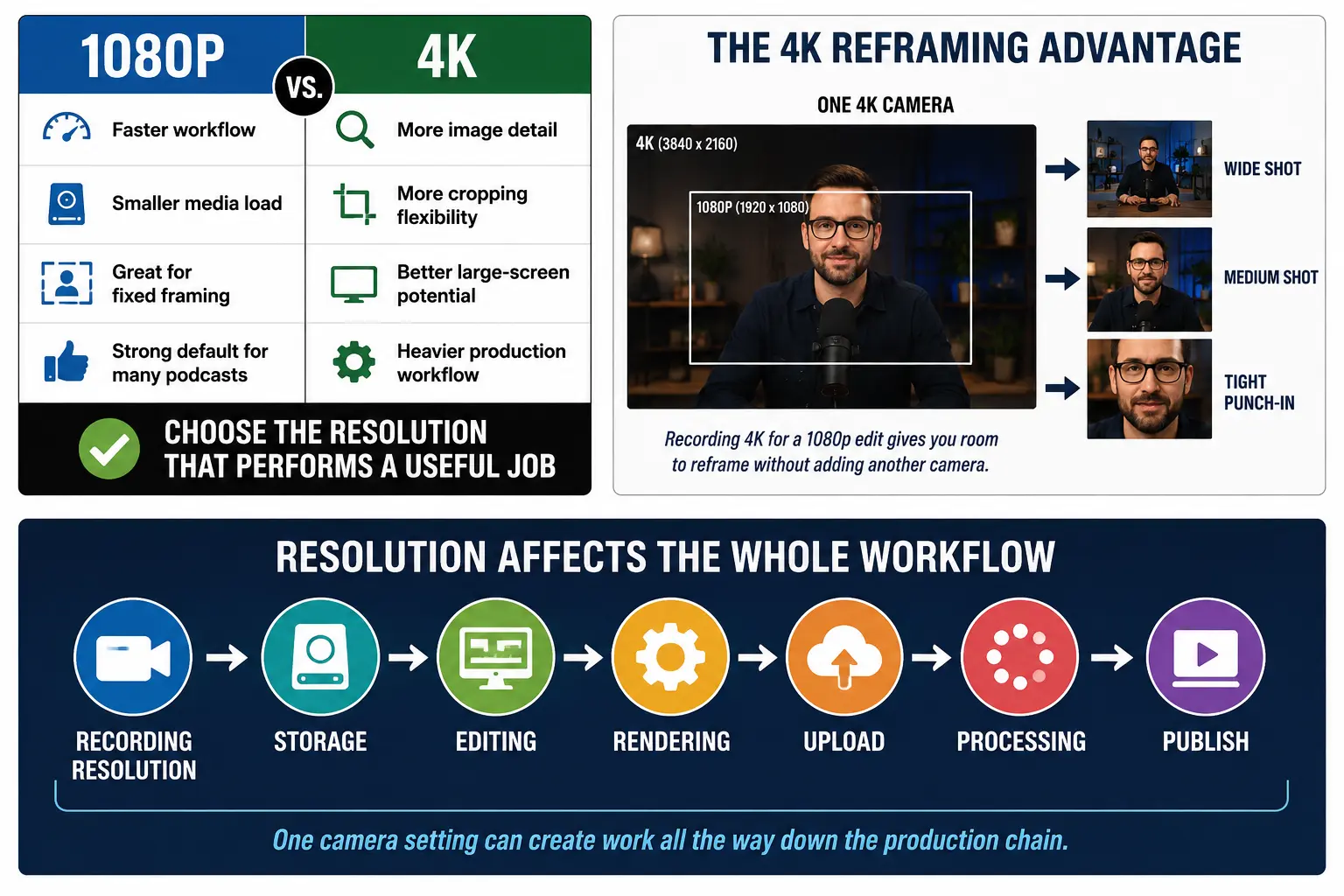
For most video podcasts, clean 1080p can still look professional. 4K becomes worth it when the extra resolution actually gives your production something useful: better reframing, stronger large-screen presentation, a higher-resolution archive, or more flexibility in post.
What 4K doesn’t give you is a magic YouTube growth button.
The real question isn’t, “Is 4K better than 1080p?”
It’s:
What does 4K allow me to do that matters enough to justify the heavier workflow?
4K vs. 1080p: The Basic Difference
1080p Full HD is normally 1920 × 1080 pixels.
4K UHD is 3840 × 2160 pixels.
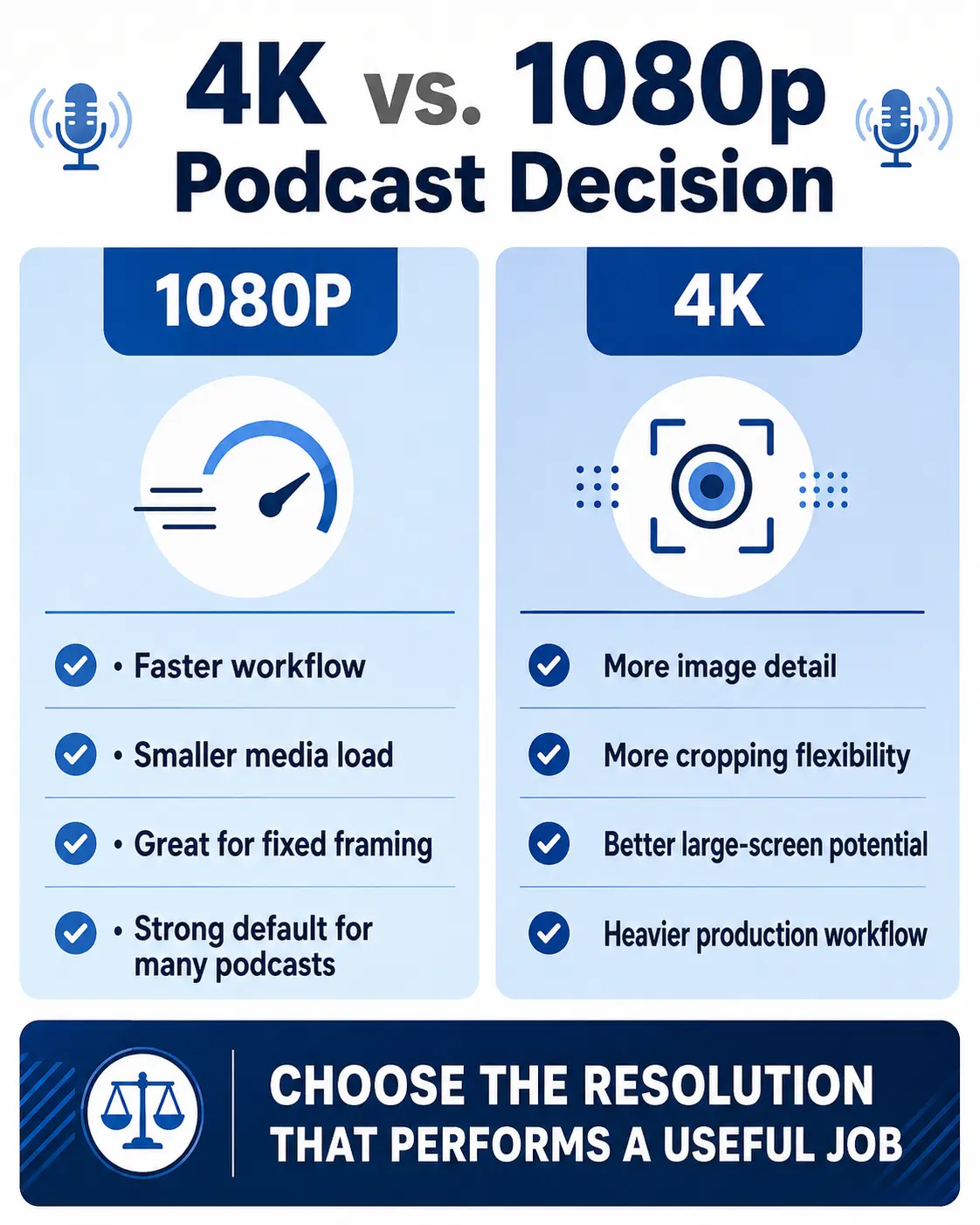
That means a 4K frame contains four times as many pixels as a 1080p frame. YouTube describes 4K as providing four times the image detail of 1080p.
More resolution can mean more visible detail, particularly on larger displays.
But those additional pixels also affect the production side of the equation.
Depending on your camera settings and codec, 4K may require:
- more recording-card capacity;
- more drive space;
- faster storage;
- more computer processing;
- proxy workflows on slower machines;
- longer exports;
- longer uploads;
- and longer processing before the 4K version is available online.
YouTube specifically notes that higher-resolution files take longer to upload and process and that 4K can take considerably longer than 1080p before its highest-quality version becomes available.
For a three-minute video, that may not matter much.
For a one-hour, multi-camera podcast being produced every week, it can matter quite a bit.
Does YouTube Give 4K Videos an Algorithm Advantage?
There is no documented rule from YouTube saying that uploading a video in 4K automatically earns additional distribution simply because it is 4K.
YouTube’s own explanations of recommendations focus on whether a video matches viewer interests and how viewers respond to it—including watching behavior, likes, dislikes, feedback and satisfaction signals.
So I wouldn’t build a video workflow around the idea that a 4K badge is an algorithm hack.
A beautifully recorded 4K podcast with a weak topic, vague title and ten-minute introduction still has a content problem.
Resolution can’t fix that.
If YouTube growth is the goal, your YouTube podcast title and thumbnail strategy is a separate—and extremely important—part of the system.
But 4K Does Have a Real Viewer Benefit
The opposite mistake is declaring that 4K doesn’t matter at all.
It can.
YouTube currently describes 4K as particularly beneficial on larger screens, and the platform’s own guidance says 4K uploads provide more detail than 1080p.
That’s increasingly relevant because YouTube isn’t just something people watch on phones and laptops anymore. YouTube continues to emphasize television and living-room viewing as an important part of its platform.
If you’re producing a polished interview show that viewers regularly watch on large TVs, the additional resolution may be genuinely useful.
But that still doesn’t mean every podcast needs it.
The correct question is whether your audience, production style and workflow benefit enough to justify it.
The Best Reason to Record a Podcast in 4K: Reframing
For many podcasters, the most useful reason to record 4K has almost nothing to do with delivering the final video in 4K.
It’s the freedom you get in post-production.
Suppose you’re recording a solo show with one camera.
You frame yourself in a medium-wide shot.
If that camera records 4K but your final project is 1080p, you have enough additional resolution to create a much tighter crop while still filling a 1080p frame.
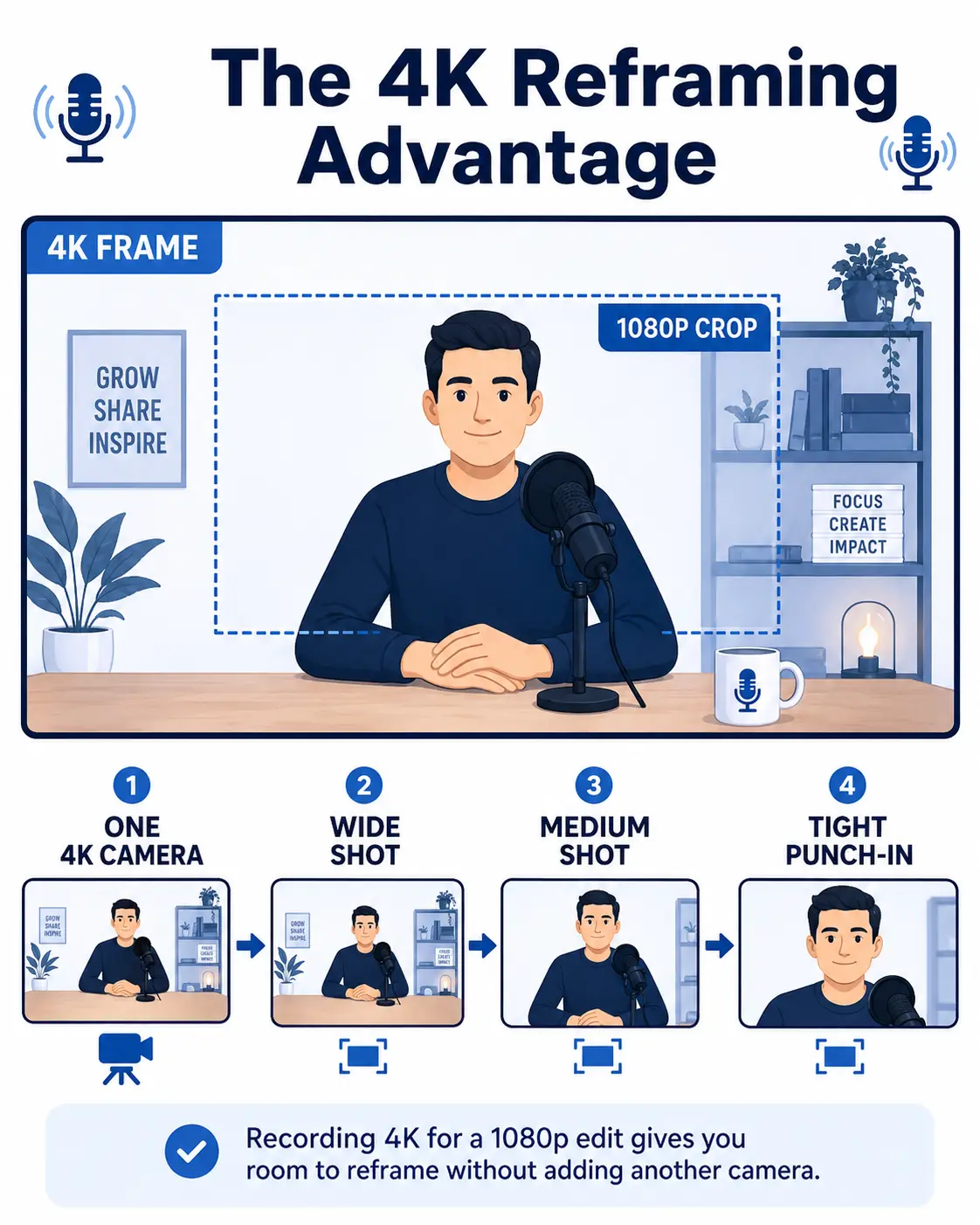
That can let one physical camera behave more like two shots:
Wide shot → digital punch-in → wide shot
You can use the tighter frame to emphasize a point, create a visual reset or cover an edit without installing another camera.
For a solo video podcast, that can be a much more practical reason to shoot 4K than simply wanting “4K” written underneath the YouTube player.
This is especially useful if you’re trying to keep your studio lean.
If you’re still designing the overall setup, see my guide to what equipment you actually need to start a podcast.
When 1080p Is the Better Podcasting Choice
1080p still makes a lot of sense when production speed and simplicity matter more than additional post flexibility.
I’d seriously consider 1080p when:
- you’re recording long episodes with several cameras;
- your computer struggles with 4K media;
- storage is becoming a recurring expense or management problem;
- you’re working with remote video sources whose original quality is already limited;
- you don’t plan to crop significantly;
- your normal delivery requirement is 1080p;
- or 4K is making your publishing process unnecessarily slow.
A clean 1080p image with good lighting, exposure, composition and focus is not an inferior podcast merely because another camera has more pixels.
That’s an important distinction.
Professional production isn’t about turning every technical setting to its maximum value. It’s about selecting the settings that serve the production.
When 4K Is Worth It
I’d lean toward 4K when you have a specific reason for using those extra pixels.
Good reasons include:
You want one-camera reframing.
This is one of the strongest arguments for 4K in a lean solo setup.
You expect meaningful large-screen viewing.
The higher resolution can become more noticeable as display size increases. YouTube itself emphasizes the larger-screen benefit of 4K.
You’re creating a long-term master.
If the footage may be reused in future edits, promotional pieces or other higher-resolution projects, keeping a 4K source gives you more options.
Your production already handles 4K efficiently.
If storage, editing, proxies, render time and upload bandwidth aren’t creating a meaningful bottleneck, the operational downside becomes smaller.
The visual presentation is part of the product.
Some interview shows, branded productions and highly visual podcasts benefit more from image detail than a simple talking-head educational show.
In those situations, 4K isn’t vanity.
It’s serving an actual production job.
4K Won’t Fix Lighting, Framing or a Bad Camera Setup
Resolution is just one piece of image quality.
YouTube’s own 4K production guidance starts with lighting and explicitly points out that turning on 4K cannot repair footage that was badly lit in the first place.
That’s exactly right.
I would rather have:
good lighting,
correct exposure,
a useful lens choice,
clean composition,
accurate focus,
and solid 1080p
than technically 4K footage that was poorly shot.
Frame rate matters too, but not because 24fps is automatically “professional” and 30fps is automatically “cheap.”
They’re different production choices.
If you’re making that decision as well, read my guide to 24fps vs. 30fps for podcast video.
Don’t Upscale 1080p and Pretend You Created 4K Detail
You can export a 1080p project into a 4K file.
What you can’t do is manufacture original image detail that your camera never captured.
Upscaling creates additional pixels mathematically. It doesn’t recreate a native 4K source.
There may be workflow reasons someone chooses to upscale a deliverable, but I would not make “trick YouTube into giving me a better codec” the foundation of a production system. I could not verify an official YouTube rule guaranteeing the codec behavior described in the previous version of this article.
If you want a genuine 4K master, the cleanest route is to capture and preserve a genuine high-resolution source.
A Simple 4K vs. 1080p Decision
Here’s the producer test I would use.
Ask yourself five questions:
- Do I need to crop or reframe the shot in post?
- Will a meaningful part of the audience benefit from higher-resolution viewing?
- Do I need a 4K archive or master for future use?
- Can my computer, storage and upload workflow handle it without becoming a recurring production problem?
- If I choose 4K, what useful result am I actually getting in return?
If you have good answers to those questions, shoot 4K.
If your answer is basically, “because 4K sounds more professional,” 1080p may be the smarter choice.
My Practical Recommendation for Video Podcasters
For a lean one-camera video podcast, I like a hybrid approach when the equipment and storage allow it:
Record in 4K when you want the reframing flexibility, then decide whether the actual program needs to be delivered in 4K or 1080p.
That separates two decisions people often combine:
capture resolution and delivery resolution.
You don’t have to make them the same.
For a straightforward podcast where the frame stays mostly fixed and fast production matters, native 1080p is still a completely reasonable workflow.
For a production that benefits from punch-ins, visual polish, large-screen viewing or higher-resolution archives, 4K may be worth the added load.
The point is to make the resolution serve the show.
Not the other way around.
Build the Workflow Around the Podcast, Not the Camera Menu
This is really a production-system problem.
Resolution affects recording, media management, editing, storage, rendering, uploading and publishing. One setting can create consequences all the way down the production chain.
That’s why I don’t think camera settings should be chosen in isolation.
If you’re rebuilding decisions like recording setup, episode workflow, content production and publishing from scratch every week, the Podcast Business System + Podcast Production OS is designed to connect those decisions into one repeatable system.
Learn more at:
https://podcastingprotips.com/system
The goal isn’t maximum production.
It’s the right production for the job.
Frequently Asked Questions
Is 1080p good enough for a video podcast?
Yes. A well-lit, properly exposed and well-composed 1080p recording can produce a professional video podcast. Whether you need 4K depends on viewing conditions, reframing needs, archival requirements and your production workflow.
Should I record my podcast in 4K and export in 1080p?
That can be an excellent workflow. A 4K source gives you additional cropping and reframing room when editing on a 1080p timeline, while the final 1080p file can keep delivery simpler.
Does uploading a podcast in 4K help it rank on YouTube?
YouTube does not document 4K resolution itself as an automatic recommendation boost. Its published explanations emphasize viewer relevance, behavior and satisfaction rather than treating resolution as a standalone growth switch.