If you want the short version first, here it is:
For podcast delivery, 128 kbps is not “wrong.”
But it also is not the only smart choice.
Apple’s current RSS guidance for spoken-word podcast audio allows a pretty wide range. For mono, the recommended range is 64–128 kbps. For stereo, it’s 128–256 kbps. That means a higher-quality stereo MP3 is completely valid. And if I’m exporting a finished stereo podcast from a clean master, I usually prefer to give the delivery chain more to work with instead of automatically defaulting to the lowest acceptable number.
That does not mean “always export 320.”
It means you should understand three different things:
- What your source recording is
- What your final delivery file is
- What the listening platform may do after you upload it
Once you separate those three decisions, podcast bitrate becomes much easier to understand.
First, Let’s Stop Mixing Up Sample Rate, Bit Depth, and MP3 Bitrate
A lot of podcast audio advice gets confusing because several different digital-audio terms get thrown into the same conversation.
Before we talk about MP3 bitrate, it helps to understand what the original digital audio file is actually storing.
Start With Stereo
A stereo recording has two separate audio channels:
- a left channel
- a right channel
In the analog world, those are two separate electrical audio signals.
When we record them digitally, the computer has to turn those continuously changing signals into numbers it can store.
That basic process is called PCM — Pulse Code Modulation.
Despite the technical name, the idea is pretty simple.
PCM takes thousands of tiny measurements of the audio waveform every second and stores those measurements as numerical values.
For stereo, it does that for both channels.
A simple way to picture the resulting digital data is like a zipper:
LEFT → RIGHT → LEFT → RIGHT → LEFT → RIGHT
The samples from the two channels are typically interleaved inside the digital file, but each channel still gets its full set of measurements.
So a 48 kHz stereo recording does not mean the left and right channels have to share 48,000 samples.
Each channel is sampled 48,000 times per second.
That is the basic digital audio underneath a normal uncompressed WAV recording.
So What Is Sample Rate?
Sample rate tells us how many times per second the analog waveform is measured.
For example:
48 kHz = 48,000 samples per second, per channel.
That tells us how frequently we’re measuring the waveform.
What Is Bit Depth?
Bit depth tells us how much numerical resolution is available for each one of those samples.
A 24-bit recording can represent each measurement with much finer numerical resolution than a 16-bit recording.
So when you see:
48 kHz / 24-bit WAV
you are describing how the original PCM audio was captured and stored.
That is production audio.
Then What Is MP3 Bitrate?
This is where the terminology changes.
An MP3 is not simply another PCM file with a smaller bit depth.
MP3 uses lossy compression. The encoder analyzes the original audio, decides what information can be removed or represented more efficiently, and creates a much smaller delivery file.
That is why MP3 quality is usually described by bitrate instead of PCM bit depth.
For example:
256 kbps MP3
means the compressed file is being allocated approximately 256 kilobits of data per second.
So these two descriptions are telling you very different things:0
48 kHz / 24-bit WAV
= how the lossless production audio is stored
256 kbps MP3
= how much compressed data is being used for the delivery copy
They are not competing settings.
They belong to two different stages of the production chain.
That distinction becomes important because I want you to keep the first one—the high-quality WAV—as your master, and make the MP3 later as a delivery file.
If you want the deeper explanation of the recording side, read Podcast Sample Rate and Bit Depth: 44.1 vs. 48 kHz and 16 vs. 24-Bit.
What Apple Recommends — and What I Actually Do
Apple’s current guidance is useful because it gives us a realistic range instead of pretending there is one magical number for every show.
For RSS-delivered podcast audio, Apple currently accepts MP3 or AAC and recommends:
- Mono: 64–128 kbps
- Stereo: 128–256 kbps
That tells us what the ecosystem considers reasonable.
But a platform recommendation is not the same thing as a production decision.
My Practical Take
Here’s how I think about it:
- If a show is true mono spoken word, a lower bitrate can absolutely work.
- If a show is stereo spoken word, I do not think you need to feel trapped at 128 kbps.
- If the show includes music beds, stereo ambience, richer processing, or more polished production, I would rather start with a stronger source file.
For a professionally produced stereo MP3, I’m comfortable saying this:
My quality-first default is 256 kbps CBR MP3.
Not because 128 is unusable.
Not because 320 is always pointless.
And not because 256 somehow turns MP3 into WAV.
I use 256 because it stays inside Apple’s recommended stereo range, gives the encoder more room, and still keeps the file practical for delivery.
So Where Does 192 kbps Fit?
192 kbps is a very reasonable middle ground.
If you want something clearly above 128 without jumping all the way to 256, 192 is a perfectly defensible delivery choice. I’d rather see someone knowingly choose 192 or 256 than reflexively export 128 because “that’s what podcasts use.”
The key is making the decision on purpose.
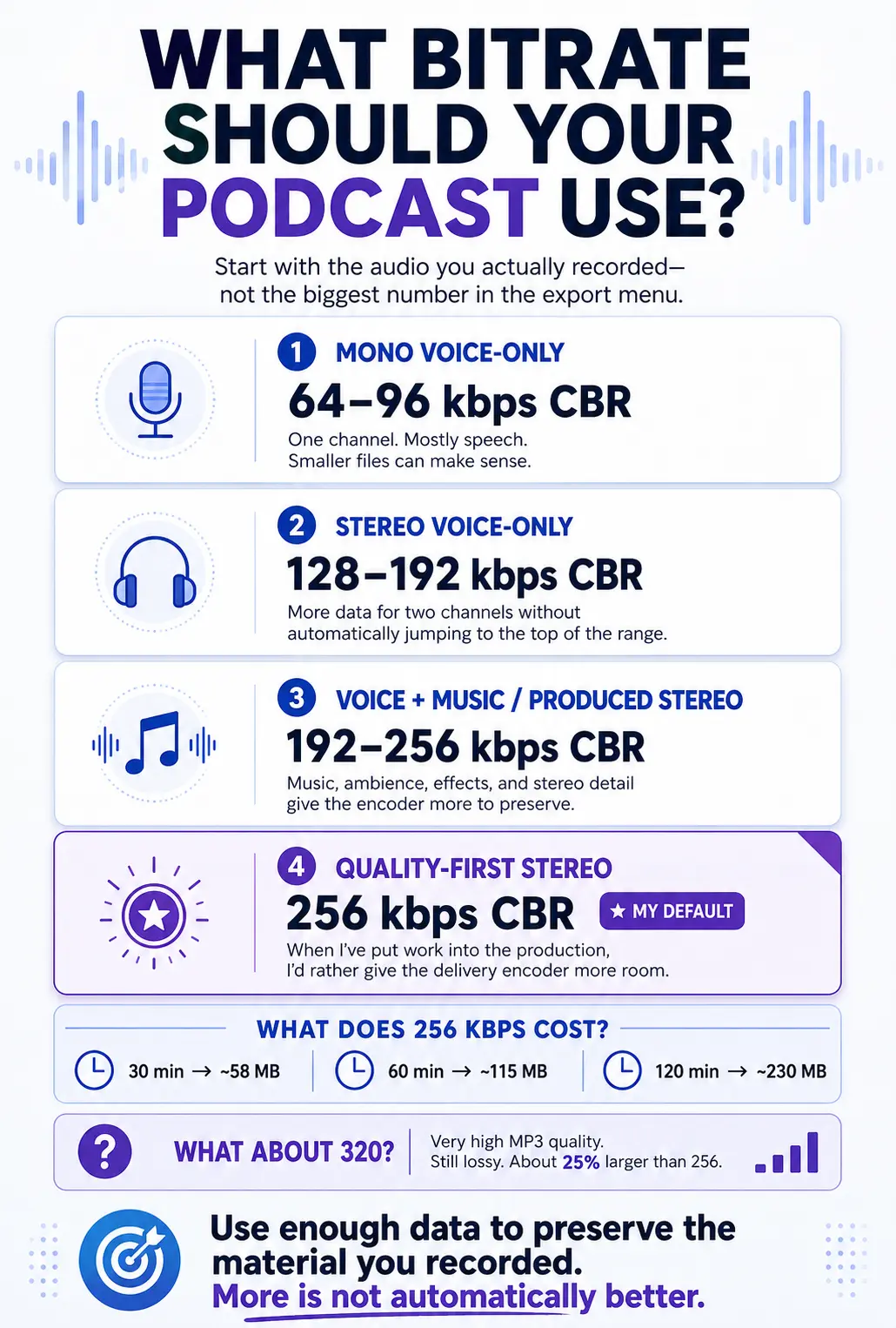
What Bitrate Should You Use for a Podcast?
Here’s the practical version.
| Situation | Acceptable / common range | What I’d do |
|---|---|---|
| Mono spoken-word podcast | 64–128 kbps | 64 or 96 can work well if the show is truly mono and voice-first |
| Stereo spoken-word podcast | 128–256 kbps | 192 or 256 kbps CBR |
| Stereo podcast with music beds / richer production | 128–256 kbps | 256 kbps CBR |
| “I want the highest MP3 quality possible” | Up to 320 kbps | 320 is fine, but I’d ask whether it gives you a meaningful benefit over 256 for your actual use case |
If you want the blunt version:
- 128 kbps = acceptable
- 192 kbps = solid upgrade
- 256 kbps = my preferred quality-first stereo choice
- 320 kbps = very high MP3 quality, but not automatically the smartest choice every time
How Much File Size Does a Higher Bitrate Actually Add?
My preference for 256 kbps CBR comes with a tradeoff: a larger file.
But “larger” is easier to judge when you can see the actual numbers.
With CBR — Constant Bitrate — file size is very predictable because the encoder uses the same amount of data every second.
The math is straightforward:
256 kbps × 60 seconds ÷ 8 bits per byte = about 1.92 MB per minute
So a 60-minute podcast exported at 256 kbps lands at roughly 115 MB.
Here is how the common MP3 bitrates compare:
| MP3 Bitrate | Approx. MB Per Minute | 30 Minutes | 60 Minutes | 120 Minutes |
|---|---|---|---|---|
| 64 kbps | 0.48 MB | ~14 MB | ~29 MB | ~58 MB |
| 96 kbps | 0.72 MB | ~22 MB | ~43 MB | ~86 MB |
| 128 kbps | 0.96 MB | ~29 MB | ~58 MB | ~115 MB |
| 192 kbps | 1.44 MB | ~43 MB | ~86 MB | ~173 MB |
| 256 kbps | 1.92 MB | ~58 MB | ~115 MB | ~230 MB |
| 320 kbps | 2.40 MB | ~72 MB | ~144 MB | ~288 MB |
Those numbers are approximate. Metadata and encoder overhead can move the final size slightly, but for planning purposes they are very close.
For a 30-minute episode, moving from 128 to 256 kbps costs you about 29 MB.
For a 60-minute episode, it costs about 58 MB.
Stretch that same episode to two hours, and the difference grows to roughly 115 MB.
That is why I do not think bitrate should be treated as a contest where the biggest number automatically wins.
Mono vs. Stereo Does Not Change This Math at the Same Bitrate
One detail that can trip you up: at a fixed CBR bitrate, mono and stereo files are roughly the same size.
A 192 kbps mono MP3 and a 192 kbps stereo MP3 are both using approximately 192 kilobits of data per second.
The difference is what the encoder has to do with that data.
With mono, it only has one audio channel to represent. With stereo, that same data budget has to preserve information from both the left and right channels.
That is one reason a simple mono voice recording can sound perfectly good at a much lower bitrate than a stereo production full of music, ambience, reverbs, and effects.
Why I Wouldn’t Always Use 256 kbps
I call 256 kbps CBR my quality-first default, not my universal rule.
The right bitrate depends on what you actually recorded, how long the episode is, and how much complexity the encoder has to preserve.
| Type of Podcast | Bitrate I’d Consider | Why |
|---|---|---|
| Mono voice-only show | 64–96 kbps CBR | One voice channel is relatively easy to encode. A much larger file may give you little practical benefit. |
| Stereo voice-only show | 128–192 kbps CBR | Straight dialogue usually does not need the same data budget as a produced music-heavy mix. |
| Stereo voice + intro/outro music | 192–256 kbps CBR | The encoder has more complex material to preserve when music enters the picture. |
| Music beds, ambience, effects, or strong stereo production | 256 kbps CBR | This is where I am most comfortable using my quality-first default. |
| Very long 120+ minute voice-first episode | 128–192 kbps CBR | File size becomes more meaningful as duration grows, especially when the source material is simple. |
| Highest-quality MP3 requested | 320 kbps | Completely valid, but I would ask whether the improvement over 256 is meaningful enough to justify another 25% in file size. |
This is where engineering judgment matters more than copying an export preset.
If I spent time producing a polished stereo episode with music beds, stereo imaging, sound design, or a carefully finished mix, I would rather give the encoder more room and use 256 kbps CBR.
If I am delivering a two-hour mono conversation with almost nothing happening except voice, exporting it at 256 just because 256 is a bigger number does not accomplish much.
And that gives you the rule I would actually use:
The goal is not to export the biggest file you can. The goal is to use enough data to preserve the material you actually recorded.
A Real-World Example
The Riverside MP3 we inspected while updating this article was a 44.1 kHz mono file at 64 kbps.
That is a very different use case from a polished stereo production.
For a simple mono voice recording, 64 kbps creates a compact delivery file because the encoder only has one channel of relatively uncomplicated material to handle.
For a stereo show with music, effects, ambience, and more production detail, I would give the encoder considerably more data.
Neither choice is automatically right or wrong.
The bitrate should match the job.
Is 320 kbps Basically the Same as WAV?
Not technically. But this is where nuance matters.
A 320 kbps MP3 can sound very close to the original source for a lot of podcast material, especially spoken-word content. For many listeners, on many devices, the difference between a clean 320 kbps MP3 and the original WAV may be extremely hard to notice.
But “very close” is not the same thing as “lossless.”
A WAV master still contains the full PCM audio. An MP3, even at 320, is still using lossy compression.
So I would say it this way:
A 320 kbps MP3 can be perceptually very close to a WAV for many podcast listening situations, but it is still not the same as a lossless master.
That distinction matters because your WAV master is your archive and your production source. Your MP3 is your delivery copy.
What Riverside Exported — and What a RØDECaster Records
This is a good place to make the difference between recording quality and delivery quality concrete.
One of the Riverside MP3 files we inspected for this update came out as:
- 44.1 kHz
- Mono
- 64 kbps MP3
That is a perfectly practical delivery file for mono spoken-word audio.
But that does not mean it represents the highest-quality source you can work from.
On the hardware side, the RØDECaster Pro II / Duo operates at a fixed 48 kHz sample rate, and the current product specs list 24-bit audio. That is production-grade source audio, not the same thing as a final compressed MP3.
So you can think of it like this:
- RØDECaster recording: strong production source
- Riverside MP3 export: compressed delivery file
- WAV master: what you want to protect
- MP3: what you publish for practical delivery
Those are different stages of the chain.
CBR vs. VBR: What’s the Difference?
If you don’t already know these terms, this is where the advice usually gets muddy.
CBR — Constant Bitrate
CBR means the file uses the same bitrate throughout the entire MP3.
If you export at 256 kbps CBR, it stays locked there.
The benefit is predictability. It’s simple, stable, and boring in a good way.
VBR — Variable Bitrate
VBR means the encoder changes the bitrate depending on what is happening in the audio.
More complex moments may get more data. Simpler moments may get less.
In theory, that can be an efficient way to preserve quality without wasting as much space.
Which One Should You Use?
For podcasts, I still prefer:
CBR for the final MP3 delivery file.
Not because VBR is evil.
Not because every VBR file breaks players.
And not because you must avoid it at all costs.
I prefer CBR because it keeps the delivery file simple and predictable. Historically, some players and workflows have been less graceful with VBR when it comes to duration and seeking behavior, and CBR avoids turning that into your problem.
So my practical guidance is this:
- Final podcast MP3: use CBR
- If you experiment with VBR: test it thoroughly before standardizing it
If your workflow works great with VBR, fine. But if you want the conservative, dependable podcast answer, CBR still wins.
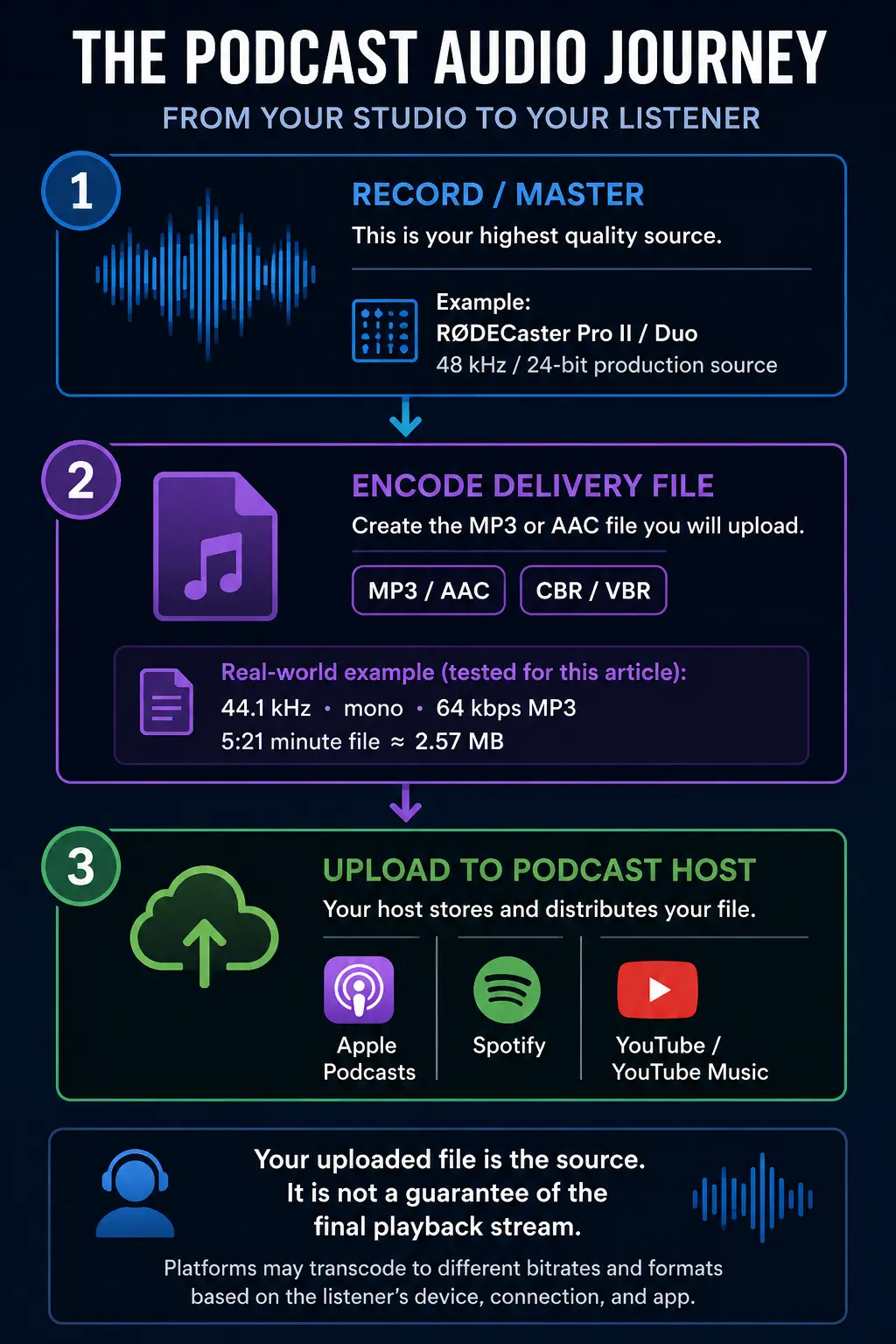
Your Host and Your Listening Platform Are Not the Same Thing
This is where a lot of bitrate advice oversimplifies reality.
Your podcast host, your RSS feed, and the listening apps are not all doing the same job.
Apple Podcasts
Apple accepts MP3 or AAC in RSS-delivered podcast feeds and explicitly recommends AAC over MP3 for RSS because AAC can achieve better quality at the same bitrate.
That doesn’t make MP3 obsolete. But it does mean the conversation has moved beyond “MP3 is always the obvious best choice.”
Spotify
Spotify is the big reminder that your exported file is not necessarily the same thing as the final listening experience.
Spotify currently says podcast playback quality is approximately:
- 96 kbps on most devices
- 128 kbps in the web player
So even if you upload a stronger source file, the platform may still create its own playback version.
That does not mean source quality is irrelevant.
It means:
Your export file is the source file, not a guarantee of the final playback path.
That’s why I care about starting with a clean, deliberate delivery file instead of obsessing over the fantasy that every listener hears my exact uploaded bits untouched.
What About AAC?
AAC deserves to be part of the conversation now.
Apple explicitly says AAC can deliver better quality than MP3 at the same bitrate and strongly recommends AAC for RSS feeds.
That matters.
But MP3 still remains the simplest common-language delivery format across podcast workflows, hosting setups, and creator habits. So for many people, MP3 is still the practical choice even if AAC is technically more efficient.
In other words:
- If you need maximum familiarity and broad workflow simplicity: MP3 is still fine.
- If you want the more modern codec discussion: AAC absolutely belongs in it.
Keep Compression at the End
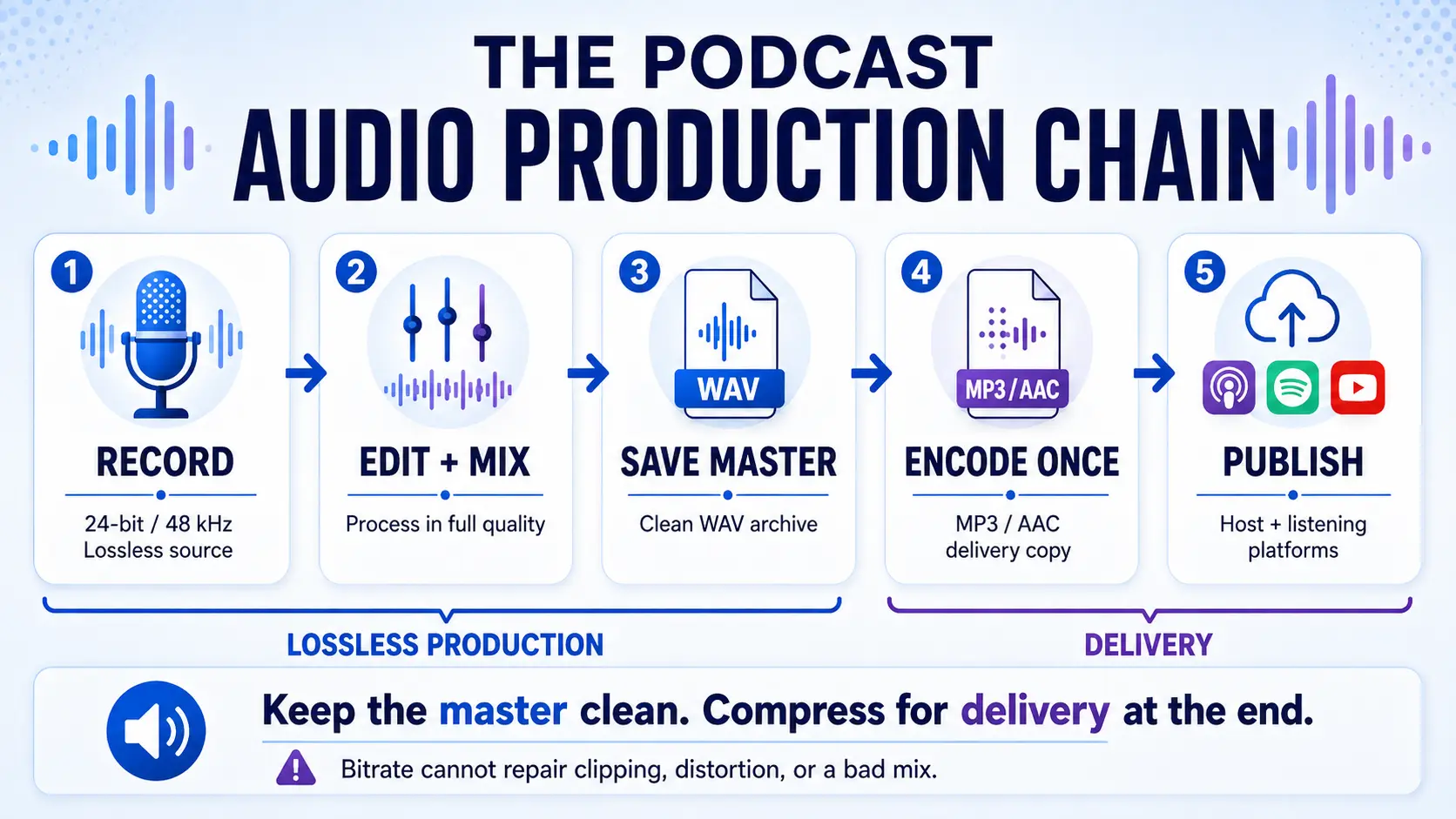
This is probably the most important production rule in the whole article.
Do not let the MP3 become your master.
Your production chain should look like this:
RECORD → EDIT + MIX → SAVE MASTER → ENCODE DELIVERY FILE → PUBLISH
That means:
- Record at full quality
- Edit at full quality
- Save a clean WAV master
- Then create the MP3 at the end
That is also why loudness and clipping matter more than chasing random bitrate numbers. A bad mix does not become a good mix because you exported it at 320 kbps.
And if you need to get your final level targets right before delivery, read Loudness Standards (LUFS): Why Your Show Sounds Quiet on Spotify but Loud on Apple Podcasts.
What About Dither?
This one gets confused all the time.
Dither is for reducing bit depth.
It is not what you use because you changed sample rate.
So:
- 48 kHz → 44.1 kHz = sample-rate conversion
- 24-bit → 16-bit = bit-depth reduction, where dither matters
And here’s the practical part for podcasters:
If you’re exporting an MP3 directly from a high-resolution master, there is usually no reason to create a separate 16-bit WAV first just so you can dither it.
Keep the clean high-resolution master. Encode the delivery file at the end.
That’s the simpler and cleaner workflow.
My Actual Podcast MP3 Recommendation
If I were setting a smart default for podcast delivery today, it would look like this:
For a mono, voice-only show
- 64 or 96 kbps CBR MP3 can be perfectly practical
For a stereo spoken-word podcast
- 192 or 256 kbps CBR MP3
- If you want my personal bias: 256
For a show with richer music or sound design
- 256 kbps CBR MP3
For creators who instinctively want 320
- That’s fine
- Just understand that it’s still MP3, still lossy, and not automatically a meaningful improvement over 256 in every podcast workflow
If you want the short producer answer:
I treat Apple’s published ranges as the acceptable zone. Then I choose 256 kbps CBR for most finished stereo podcast MP3s because I’d rather start the delivery chain with a stronger source file.
The Bottom Line
128 kbps is not the enemy.
But it also shouldn’t be treated like the one professional answer for every podcast.
Here’s the cleaner way to think about it:
- Recording quality is one decision
- Master quality is another
- Delivery bitrate is another
- Playback platform behavior is another
Once you separate those, the answer gets easier.
For most stereo podcast delivery, I think 256 kbps CBR MP3 is a smart, quality-first choice.
192 is a very solid middle ground.
128 is still acceptable.
320 is still valid, but not automatically necessary.
And none of those numbers replace the importance of a clean recording, a good mix, and a protected WAV master.
If you want the rest of your production decisions to work the same way — clear, deliberate, and connected instead of random — explore the Podcast Business System.
FAQ
Is 128 kbps good enough for a podcast?
Yes. It can absolutely be good enough, especially for spoken-word content. The problem is not that 128 is unusable. The problem is pretending it is the only smart choice for every show.
Is 256 kbps overkill for a podcast?
No. Not if you want a stronger stereo source file and you’re comfortable with the larger file size. It sits inside Apple’s recommended stereo range and is a perfectly reasonable quality-first choice.
Should I use CBR or VBR for podcast MP3 files?
My recommendation is CBR for final podcast delivery. VBR can work, but CBR is the simpler, safer default when you want a predictable delivery file.
Does Spotify stream the exact MP3 I upload?
Not necessarily. Spotify currently states that podcast playback is approximately 96 kbps on most devices and 128 kbps in the web player. That means your uploaded file is a source file, not always the exact final listening stream.
Stop Rebuilding Your Production Decisions Every Episode
Choosing the right bitrate is one decision. Your recording format, loudness target, file organization, editing workflow, export settings, publishing process, and quality checks all need the same kind of consistency.
The Podcast Business System + Podcast Production OS helps you connect those production decisions to the larger job your podcast is supposed to perform—so you’re not rebuilding the process every time you hit record.