Uploading your podcast to YouTube is not the same as publishing it to an audio podcast app.
You can use the same episode. You can even start with the same metadata. But your YouTube title and thumbnail have another job: together, they have to help the right viewer understand what the video is about and decide whether it is worth watching.
That means a title like:
Episode 42: Interview With John Smith
may accurately identify the episode while doing very little for someone who has never heard of John Smith.
A better YouTube package starts with a different question:
What would make the right viewer care about this episode before they know the host, guest, or episode number?
That is the real starting point for YouTube podcast SEO.
YouTube SEO Is More Than Putting a Keyword in the Title
YouTube says its search system considers three broad elements: relevance, engagement, and quality. For relevance, YouTube can consider how well the title, description, tags, and actual video content match the viewer’s search. Engagement signals such as watch time for a particular video may also help YouTube determine whether people found the search result useful.
So yes, your title matters.
But stuffing the title with keywords isn’t the strategy.
A better goal is:
Make the topic clear enough for YouTube and compelling enough for the right person to choose it.
Then make sure the actual episode delivers what that package promised.
That’s an important distinction.
A clickable title that attracts the wrong person isn’t necessarily a win. YouTube itself warns against using misleading titles and thumbnails and notes that high click-through rate paired with weak viewing behavior can be a sign that the packaging overpromised.
Start With the Episode Promise, Not the Guest Name
Before writing a YouTube title, finish this sentence:
After watching this episode, the viewer will understand, avoid, decide, fix, or be able to ________.
That’s your episode promise.
Now build the title around that promise.
For example:
Weak:
Episode 28: A Conversation With Sarah Miller
Better:
How to Stop Losing Podcast Guests During Pre-Production
Sarah may still matter. Put her name in the title if she creates real recognition or adds useful context.
But don’t automatically give the most valuable title real estate to the guest simply because the episode is an interview.
The subject normally matters more to a cold viewer than your internal episode numbering system.
If you want a broader framework for naming podcast episodes across audio platforms as well, see my guide to writing stronger podcast episode SEO titles.
Use Search-Led or Curiosity-Led Packaging
Not every YouTube video needs the same kind of title.
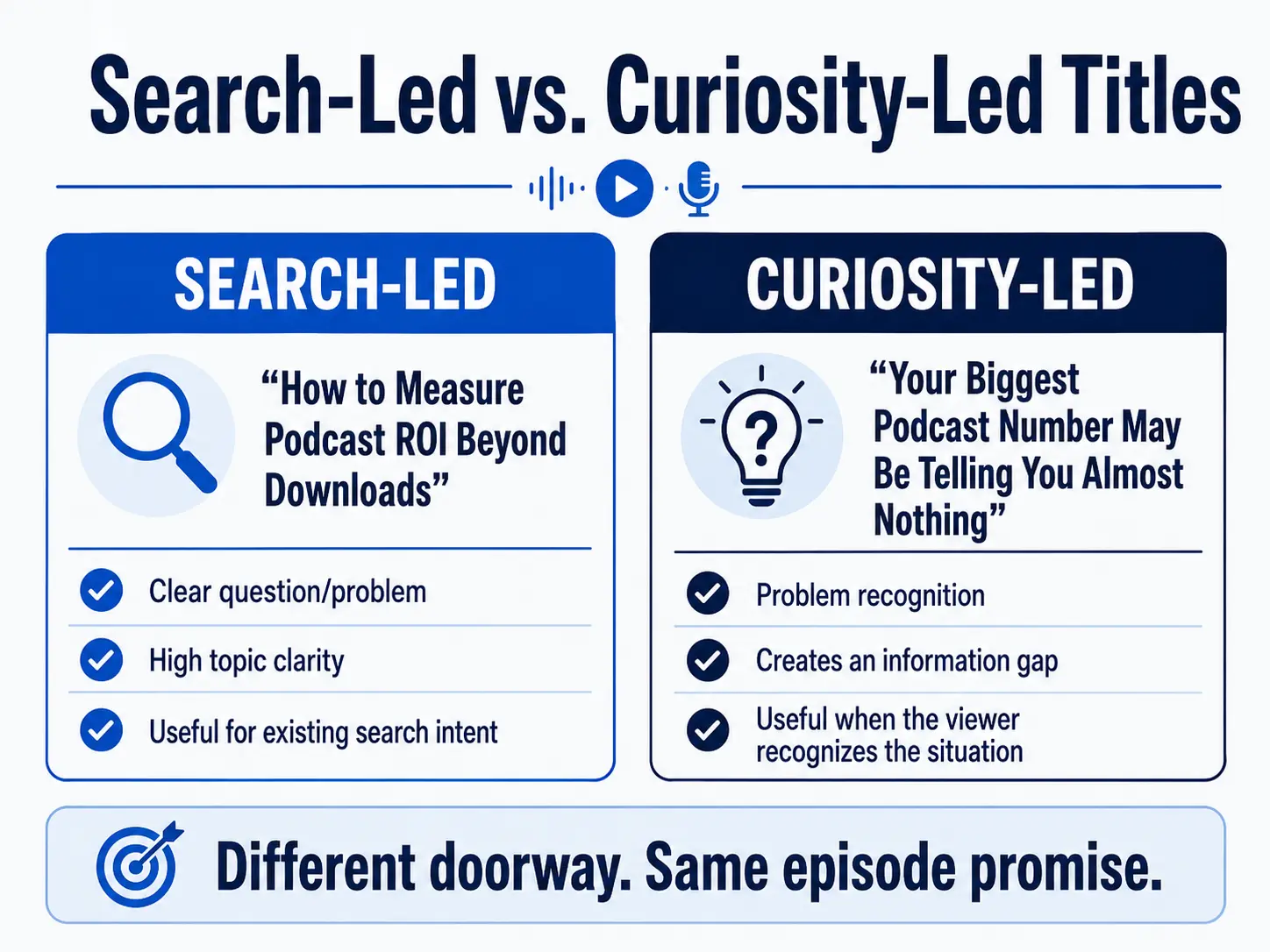
For podcasts, I find it useful to think about two basic packaging modes.
Search-Led Titles
A search-led title answers something a viewer may already be looking for.
Examples:
- How to Prepare a Podcast Guest Before Recording
- What Does a Podcast Producer Actually Do?
- 4K vs. 1080p for Video Podcasts: Which Should You Record?
- How to Measure Podcast ROI Beyond Downloads
The subject is clear immediately.
This is particularly useful for educational episodes, tutorials, explanations, comparisons, and recurring questions in your niche.
Curiosity-Led Titles
A curiosity-led title begins with a problem, contradiction, consequence, or insight.
Examples:
- Your Podcast Guest Isn’t the Problem. Your Prep Is.
- Why Your Podcast Looks Expensive but Still Feels Amateur
- The Podcast Metric That Looks Important but Proves Almost Nothing
- You’re Creating Too Much Content From Every Episode
These can work when the viewer doesn’t necessarily know the exact phrase to search but recognizes the situation.
Neither method is automatically better.
Choose the one that matches how the viewer is likely to encounter and understand the episode.
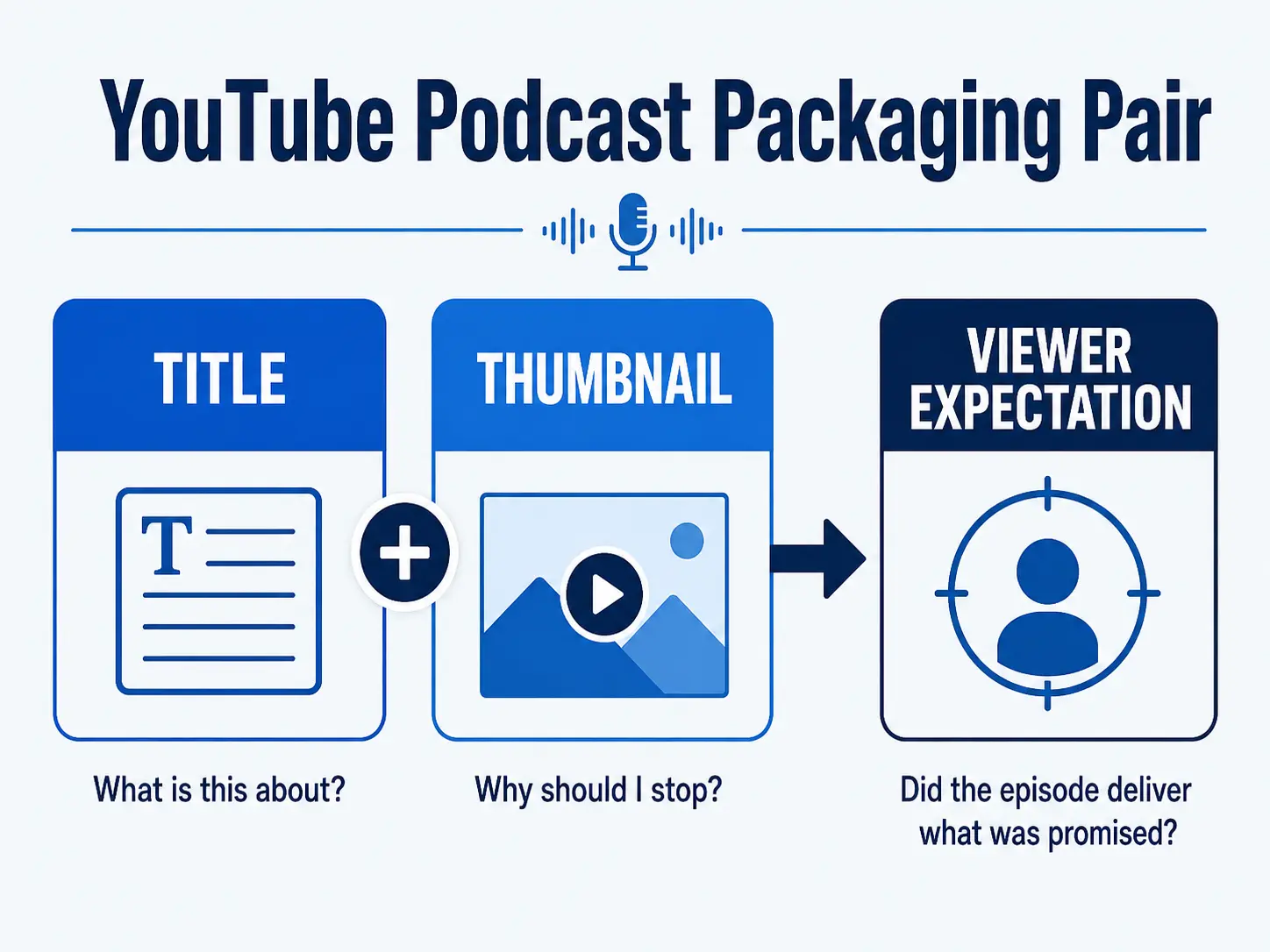
Your Thumbnail and Title Should Work Together
One of the easiest thumbnail mistakes is repeating the title almost word for word.
If the title already says:
Why Podcast Downloads Don’t Prove Business Results
you probably don’t need the thumbnail to say:
PODCAST DOWNLOADS DON’T PROVE BUSINESS RESULTS
You’re using two pieces of screen real estate to communicate one idea.
Instead, give each piece a job.
For example:
TITLE:
Why Podcast Downloads Don’t Prove Business Results
THUMBNAIL:WHAT DID IT DO?
Or:
TITLE:
How to Prepare a Podcast Guest Before Recording
THUMBNAIL:DON'T WING THIS
The title creates context.
The thumbnail creates another reason to stop and investigate.
Together, they make one promise.
Keep Podcast Thumbnails Simple Enough to Read Quickly
There isn’t one thumbnail formula every podcast should use.
You don’t always need a shocked face.
You don’t always need three words.
And you definitely don’t need another microphone icon just to prove that the video is a podcast.
Start with clarity.
A useful podcast thumbnail may include:
- the host or guest when that person matters;
- one strong visual idea;
- a short supporting phrase;
- enough contrast to remain readable at a small size.
Think of simplicity as a constraint, not a law.
If someone needs ten seconds to decode the thumbnail, you’ve probably put too much into it.
The viewer is normally making the decision much faster than that.
Don’t Make the Thumbnail Promise More Than the Episode Delivers
This is where title and thumbnail strategy connects directly to retention.
If your packaging implies:
THIS ONE SETTING RUINS YOUR PODCAST AUDIO
and the episode spends six minutes talking about your weekend before finally discussing microphone gain, you have a production problem—not an SEO problem.
The packaging created one expectation.
The episode delivered another.
YouTube’s own guidance recommends evaluating click-through rate with viewing behavior rather than optimizing clicks in isolation.
Your opening therefore needs to confirm quickly that the viewer made the right choice.
That’s why title strategy and episode structure shouldn’t be treated as two unrelated jobs.
For more on that part of the workflow, see how the opening of a video podcast affects viewer retention.
Write Multiple Titles Before You Publish
Don’t fall in love with the first title.
I would normally write at least three different angles before choosing one.
Suppose the episode teaches why podcast downloads are incomplete as a business metric.
You could write:
Search-led:
How to Measure Podcast ROI Beyond Downloads
Problem-led:
Why Podcast Downloads Don’t Prove Business Results
Curiosity-led:
Your Biggest Podcast Number May Be Telling You Almost Nothing
Same episode.
Different doorway.
Writing several versions forces you to decide what the episode is actually selling to the viewer: the topic, the problem, the result, or the insight.
Test Packaging Instead of Guessing Forever
YouTube has expanded its built-in testing tools so eligible creators can test multiple title and thumbnail variations rather than relying only on intuition. YouTube announced support for testing up to three titles and thumbnails on a video.
Where the feature is available in your YouTube Studio account, use it.
But test meaningfully different concepts.
Changing:
Podcast SEO Mistakes
to:
Podcast SEO Mistakes!
isn’t much of a test.
Compare angles.
For example:
A: Why Nobody Is Clicking Your Podcast on YouTube
B: YouTube Podcast SEO: 5 Title Mistakes to Fix
C: Stop Uploading Your Podcast Like an Audio Show
Now you’re learning something about what your audience responds to.
And don’t judge everything from CTR alone. Traffic source, audience, impressions, and viewing behavior all affect how CTR should be interpreted. YouTube specifically advises creators not to make decisions from small fluctuations or insufficient data.
Set the Show Up as a Podcast in YouTube Studio
Titles and thumbnails aren’t the entire YouTube podcast setup.
YouTube currently treats a podcast show as a playlist containing its full-length episode videos. You can create a podcast directly in YouTube Studio or add podcast features to an existing playlist.
Eligible podcast content may receive features including:
- inclusion in YouTube Music;
- podcast badges;
- additional podcast discovery surfaces;
- recommendations to listeners with related interests;
- improved podcast search features.
YouTube also supports podcast delivery through RSS feeds in eligible locations.
The important distinction is that setting a playlist as a podcast does not magically fix weak episodes or weak packaging.
It gives YouTube the correct structural information.
You still need a useful episode, a clear title, strong packaging, and a reason for the viewer to stay.
The Bigger Strategy: Packaging Starts Before You Open YouTube Studio
Here’s the part most title tutorials miss.
A weak YouTube title can be a symptom of an upstream podcast problem.
If you can’t write a clear title because you’re not sure what the episode actually does for the listener, the real problem may not be SEO.
It may be the episode.
You should already know:
Who is this episode for?
What problem or question does it address?
What is the useful promise?
Why should this person care now?
Once those decisions are clear, titles become much easier.
The same is true for thumbnails.
You aren’t trying to invent excitement after recording.
You’re packaging an episode that was built around a useful idea in the first place.
That’s the difference between treating YouTube optimization as a last-minute publishing chore and treating it as part of the production system.
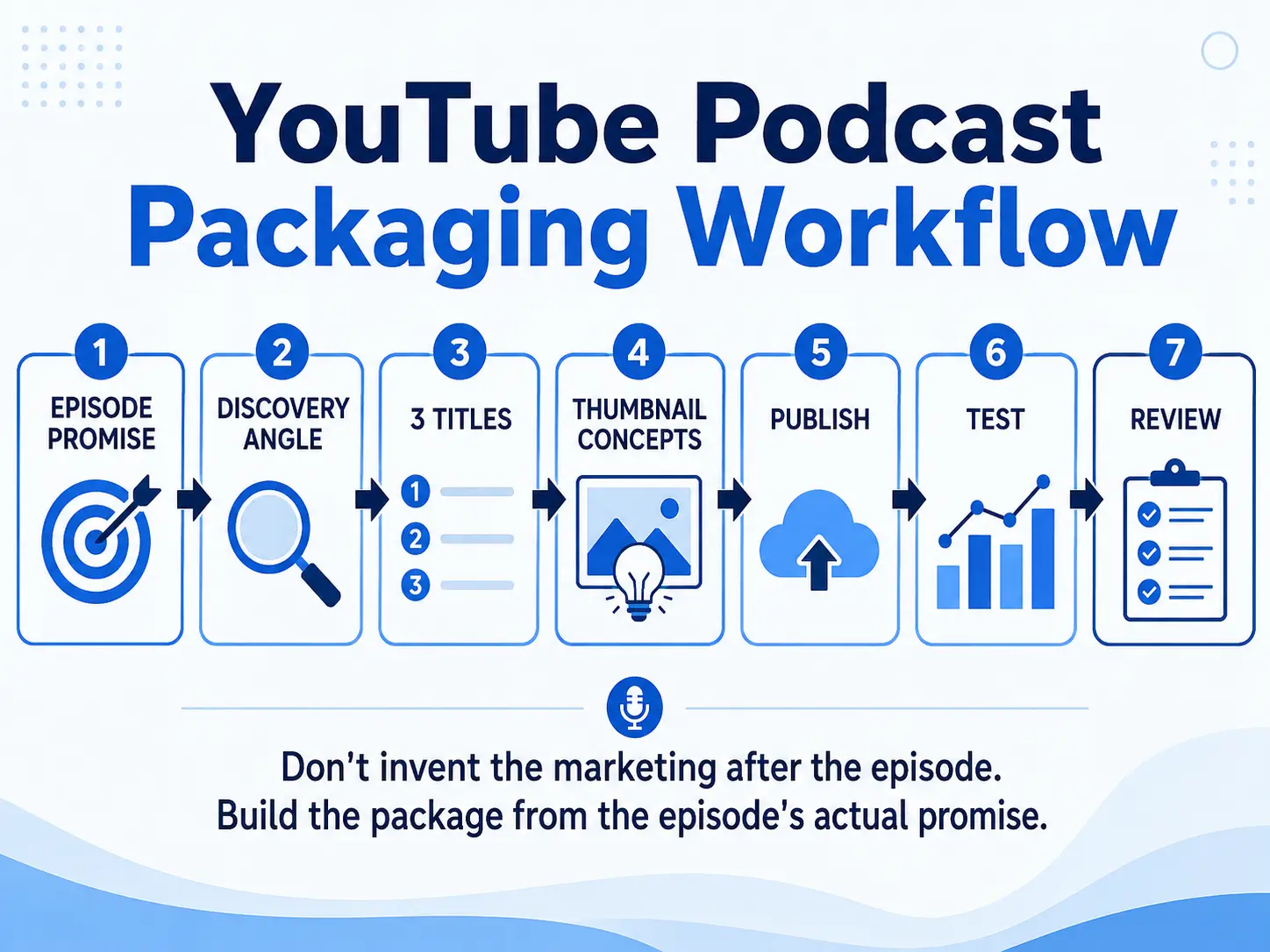
A Simple YouTube Podcast Packaging Workflow
Before publishing your next episode:
- Write the episode promise in one sentence.
- Decide whether the strongest discovery angle is search-led or curiosity-led.
- Write at least three title options.
- Create two or three genuinely different thumbnail concepts.
- Make sure the title and thumbnail complement rather than repeat one another.
- Confirm that the opening delivers the promise immediately.
- Add the full episode to the correctly configured podcast in YouTube Studio.
- Use title/thumbnail testing where available.
- Review CTR together with watch behavior and traffic source.
- Use what you learn to improve the next episode.
That last step matters.
Don’t optimize one upload in isolation forever.
Build a repeatable publishing process.
If you’re also turning your YouTube episode into clips, articles, email, and other assets, my guide to turning one podcast episode into multiple content assets shows how that larger workflow can fit together.
Titles and Thumbnails Are Packaging, Not Rescue Equipment
A good title can make a useful episode easier to understand.
A good thumbnail can make someone curious enough to click.
Neither can rescue an episode that doesn’t have a clear audience, problem, promise, or useful payoff.
Start with the episode.
Then package it for the environment where you’re publishing it.
That’s a much more durable YouTube strategy than chasing another supposed algorithm trick.
If every episode requires you to rethink the audience, angle, CTA, production workflow, and promotion plan, the problem is bigger than your YouTube title or thumbnail. The Podcast Business System + Podcast Production OS gives you a connected way to plan, produce, publish, promote, and measure your podcast without rebuilding the process every time.
Frequently Asked Questions
Should my YouTube podcast title be the same as my Spotify or Apple Podcasts title?
Not necessarily. The underlying episode can be the same while the title is adapted to the way people discover and evaluate content on each platform. Keep the subject consistent, but optimize the packaging for the environment.
Should I put the guest’s name in a YouTube podcast title?
Use the guest’s name when it adds recognition, credibility, or useful context. If the guest isn’t already familiar to the intended viewer, the episode’s problem, question, or promise will often deserve more prominent placement.
How many words should go on a podcast thumbnail?
There is no universal number. Keep any thumbnail text short enough to understand quickly at small sizes and use it to add something the title does not already communicate.
Should I set my YouTube playlist as a podcast?
If the playlist contains the full episodes of your podcast, YouTube provides podcast-specific setup and discovery features for eligible content. Clips and Shorts should not be added as full podcast episodes.