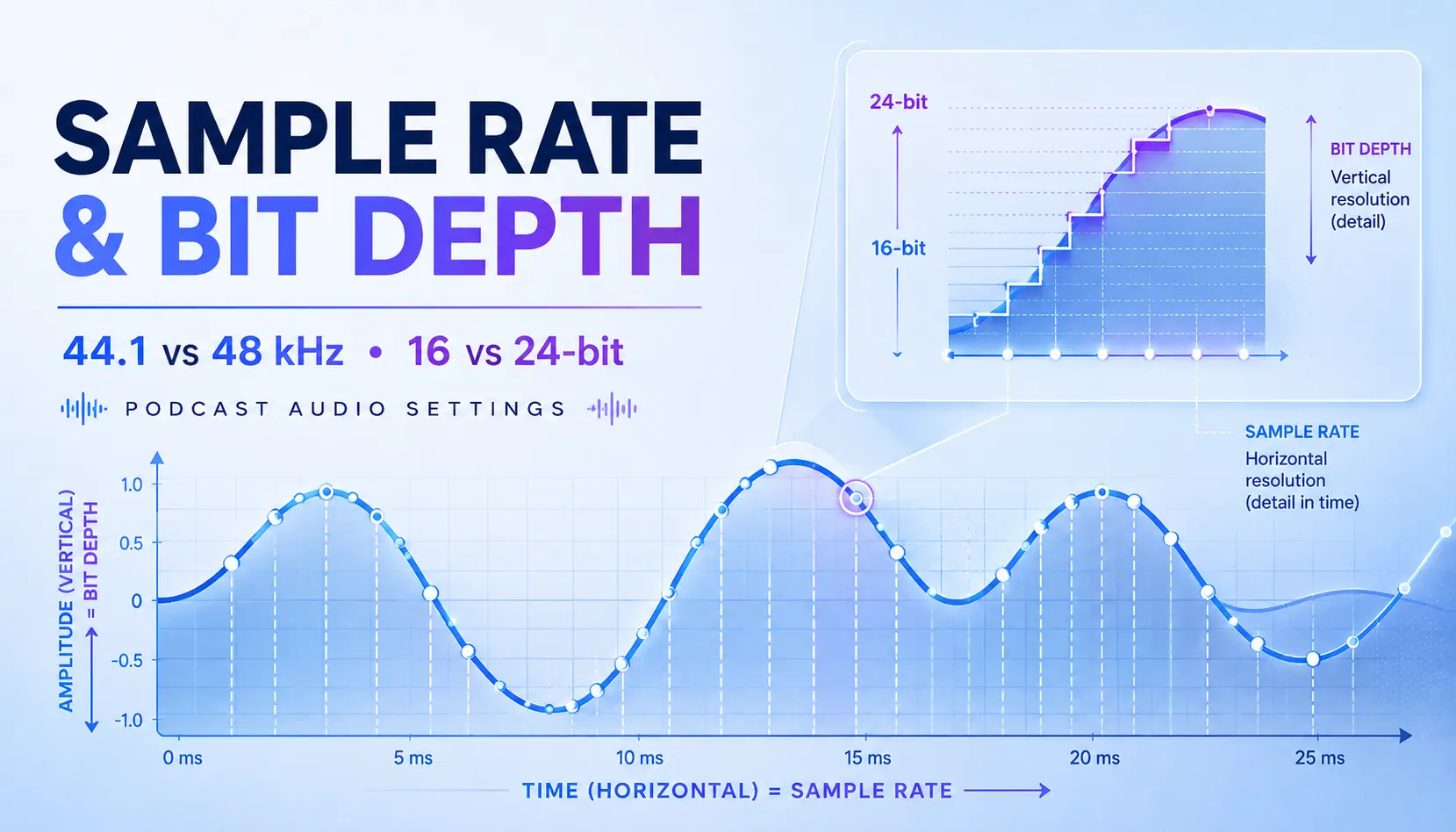
If your recording software gives you a choice between 44.1 kHz and 48 kHz, or 16-bit and 24-bit, here’s the simple answer:
For most modern podcasts, I recommend recording at 24-bit / 48 kHz.
That’s especially true if you’re producing video along with the podcast.
But there’s an important second part to that answer: 44.1 kHz and 16-bit audio aren’t garbage. Your podcast will not collapse into a pile of digital dust because somebody recorded it at CD resolution.
The real advantage of 24-bit / 48 kHz is the production workflow. You get more usable dynamic range while recording, and 48 kHz fits naturally into modern video production.
Let’s break down what those numbers actually mean without turning this into an electrical engineering class.
The Short Answer: Best Podcast Recording Settings
For a typical podcast production, this is a solid starting point:
- Sample rate: 48 kHz
- Bit depth: 24-bit
- Recording format: WAV or another lossless format when available
- Editing: Stay at the original recording sample rate
- Final delivery: Export according to your podcast host, RSS, or video platform requirements
For video uploads, YouTube currently recommends a 48 kHz audio sample rate. Apple Podcasts accepts 44.1 and 48 kHz audio in common podcast delivery formats, so 48 kHz works comfortably across an audio-and-video workflow.
If your existing show is recorded at 44.1 kHz, though, don’t panic and rebuild your studio.
The goal is consistency.
What Is Sample Rate?
Sample rate tells you how many times per second a digital recording system measures an analog audio signal.
Sound starts as a continuous wave. Digital recording converts that changing waveform into a sequence of measurements.
A rough analogy is video frame rate.
A camera might capture 24 or 30 frames every second. Digital audio captures far more measurements:
- 44.1 kHz = 44,100 samples per second
- 48 kHz = 48,000 samples per second
Adobe describes sample rate as the number of digital “snapshots” taken from the audio signal each second and notes that sample rate determines the frequency range a recording can represent.
The frame-rate comparison isn’t mathematically perfect, but it gives you the right mental picture.
Sample rate answers:
How frequently are we measuring the waveform?
Bit depth answers a different question.
Is 48 kHz Better Than 44.1 kHz for Podcasts?
For a modern podcast that includes video, I generally choose 48 kHz.
Not because 44.1 kHz suddenly sounds terrible.
44.1 kHz has been used successfully for high-quality digital audio for decades, and Apple still supports it for podcast delivery.
The practical reason for using 48 kHz is workflow.
Video production commonly uses 48 kHz, and YouTube currently recommends 48 kHz audio for uploaded video.
So if you’re recording:
microphone → remote recording platform → video editor → YouTube → podcast feed
keeping the production at 48 kHz reduces unnecessary format changes along the way.
That’s a better reason to choose it than claiming your audience is going to hear some dramatic jump in vocal quality between 44.1 and 48.
They probably won’t.
Does 48 kHz Prevent Audio Drift?
Not by itself.
This is an important correction because you’ll sometimes hear people say that simply switching everything to 48 kHz eliminates audio drift.
Matching sample rates is good production practice. But separate cameras, recorders, interfaces, and computers can still use slightly different internal clocks.
Professional digital systems deal with this through synchronization and clocking. Focusrite, for example, documents external word-clock synchronization for connected digital equipment.
For a normal podcast, the practical rule is simpler:
Record everything at the same intended sample rate whenever possible, and don’t treat the sample-rate setting as a magic sync button.
What Is Bit Depth?
Bit depth determines how many amplitude values are available for each audio sample.
If sample rate asks how often the waveform is measured, bit depth determines how precisely each measurement can be represented.
Two common recording depths are:
- 16-bit: 65,536 possible amplitude values
- 24-bit: 16,777,216 possible amplitude values
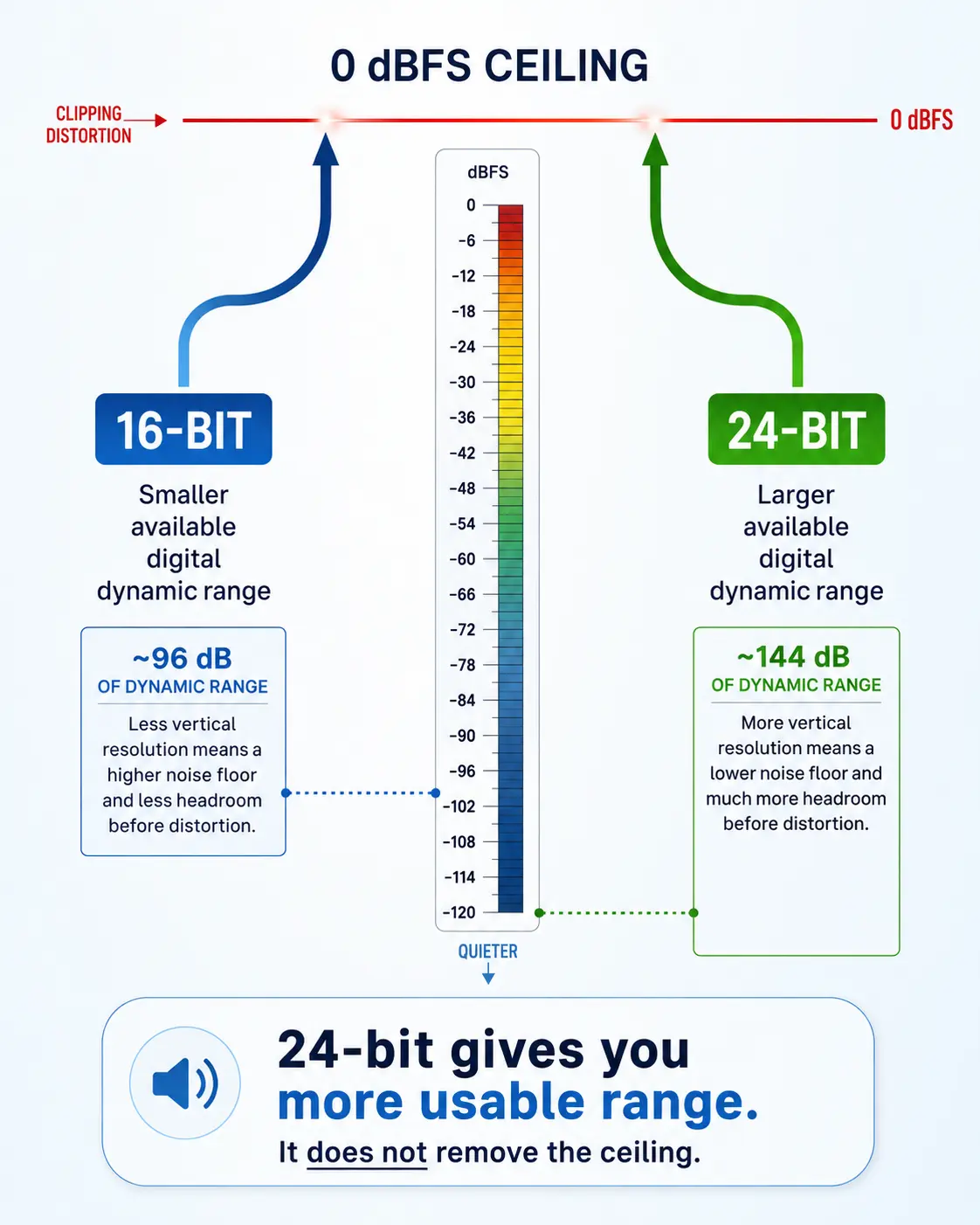
Adobe lists theoretical dynamic range at approximately 96 dB for 16-bit audio and 144 dB for 24-bit audio.
That’s a huge numerical difference.
But here’s where the explanation usually goes off the rails.
It doesn’t mean a 24-bit recording automatically sounds dramatically more detailed than a properly recorded 16-bit podcast.
For production, the big advantage is that 24-bit gives you a much larger usable dynamic range and lower quantization noise floor.
That makes conservative recording levels much easier to live with.
Why I Recommend 24-Bit for Podcast Recording
When you’re recording spoken word, I don’t want you trying to park every syllable right under 0 dBFS.
That’s how people end up clipping a laugh, an excited answer, or the guest who suddenly decides the microphone is twenty feet away and starts yelling at it.
With 24-bit recording, you can leave sensible recording margin and still have enormous digital dynamic range available.
That means there’s no good reason to record unnecessarily hot just because you’re afraid a quieter signal won’t contain enough resolution.
This is one of the practical advantages of 24-bit production.
Your recording level can breathe.
But 24-Bit Does Not Prevent Clipping
This distinction matters.
24-bit fixed-point recording still has a ceiling.
If your microphone preamp, interface, analog-to-digital converter, or fixed-point digital recording exceeds its usable range, the recording can still distort.
Higher bit depth does not magically move 0 dBFS out of the way.
That’s why proper gain staging still matters.
As a practical starting point, leave room for unexpected peaks instead of trying to make the incoming waveform look enormous. RØDE’s current gain-staging guidance, for example, recommends avoiding clipping and leaving several decibels of recording margin.
In other words:
24-bit gives you room to record more conservatively. It doesn’t give you permission to ignore the meters.
What About 32-Bit Float Recording?
You’ve probably started seeing 32-bit float advertised on portable recorders, wireless systems, interfaces, and field-recording gear.
This is different from simply moving from 16-bit to 24-bit fixed-point audio.
A properly designed 32-bit float recording system can represent signal levels beyond the normal 0 dBFS boundary inside the recorded file. On hardware built to take advantage of it, that can make unexpectedly loud material recoverable in post-production.
Sound Devices describes this as one of the major benefits of 32-bit float recording and notes that signal above 0 dBFS can be brought back down later without the digital overload behavior of a conventional fixed-point file.
But there’s still a caveat.
32-bit float cannot resurrect audio that was already destroyed somewhere earlier in an analog signal chain.
So don’t read “32-bit float” on a product box and assume gain staging, microphone technique, or analog electronics no longer matter.
For most standard podcast setups, 24-bit is still an excellent default.
32-bit float becomes especially useful when levels are unpredictable or you’re using recording equipment specifically designed around that workflow.
Do You Need 96 kHz or 192 kHz for a Podcast?
Usually, no.
Higher sample rates absolutely have professional applications. But spoken-word podcasting normally doesn’t need them.
Going from 48 kHz to 96 or 192 kHz increases storage, bandwidth, and processing requirements. That can make your projects heavier without solving a meaningful podcast problem.
Apple can accept higher-rate lossless source audio in some workflows, but its RSS podcast recommendations still accommodate the ordinary 44.1/48 kHz range.
For a podcast, I’d rather see you get these things right:
- microphone placement;
- room acoustics;
- clean gain staging;
- consistent recording settings;
- useful editing;
- sensible loudness;
- a clean master.
A 192 kHz recording of somebody sitting six feet from the microphone in a reflective kitchen is still somebody sitting six feet from the microphone in a reflective kitchen.
More numbers don’t fix upstream problems.
Sample Rate, Bit Depth, and Bitrate Are Not the Same Thing
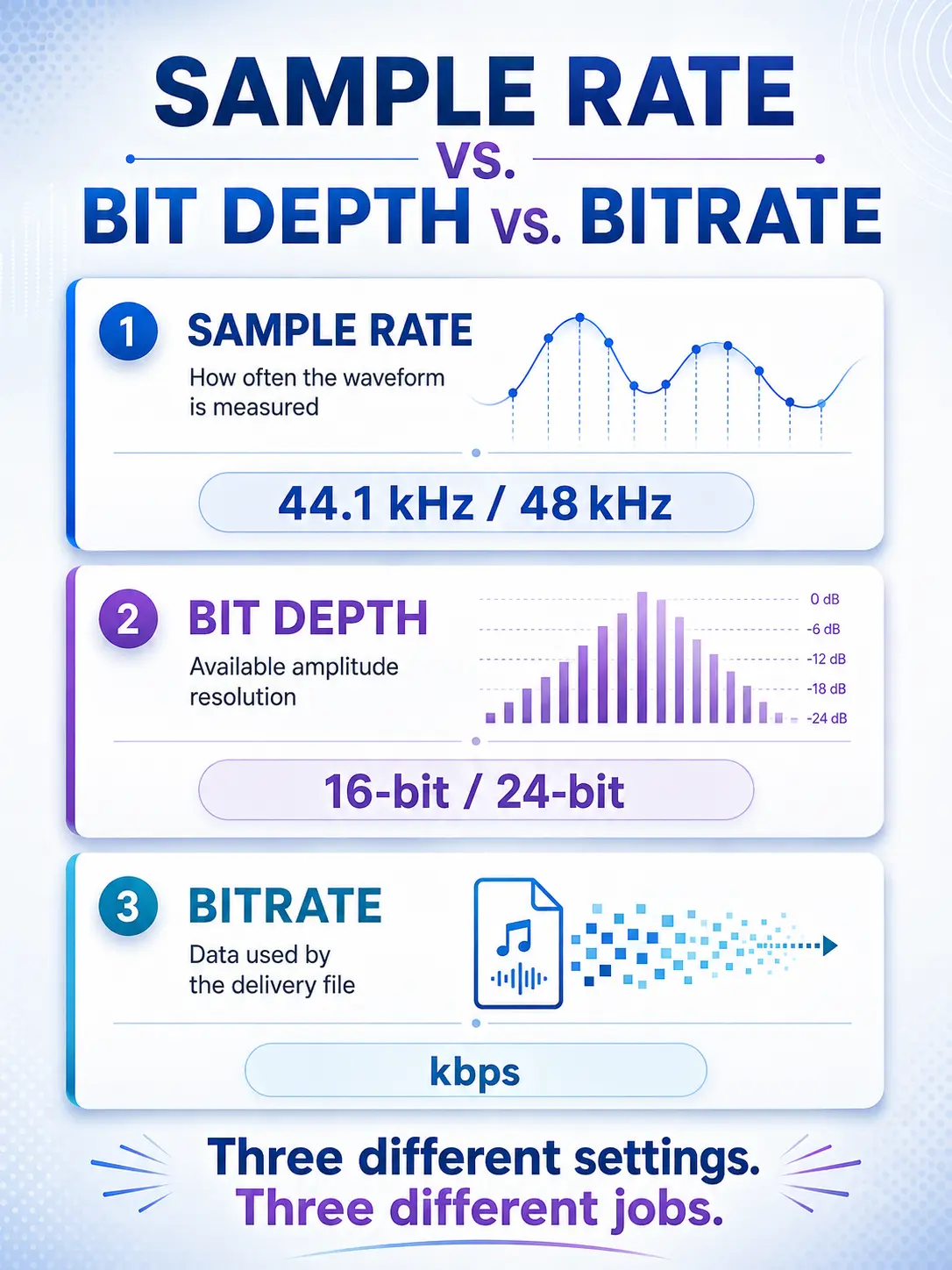
These three terms get mixed together constantly.
Here’s the simple distinction:
Sample rate
How many times per second the waveform is measured.
Bit depth
How much amplitude resolution and digital dynamic range each sample can represent.
Bitrate
How much data is being used per second in an encoded file such as an MP3 or AAC.
That last one becomes especially important when you create the final podcast delivery file.
A 24-bit / 48 kHz WAV recording and a 128 kbps MP3 aren’t competing versions of the same setting.
They’re describing different parts of the production chain.
If you want to go deeper into that distinction, read Podcast Bitrate Realities: Who Is Actually Compressing Your Audio Files?
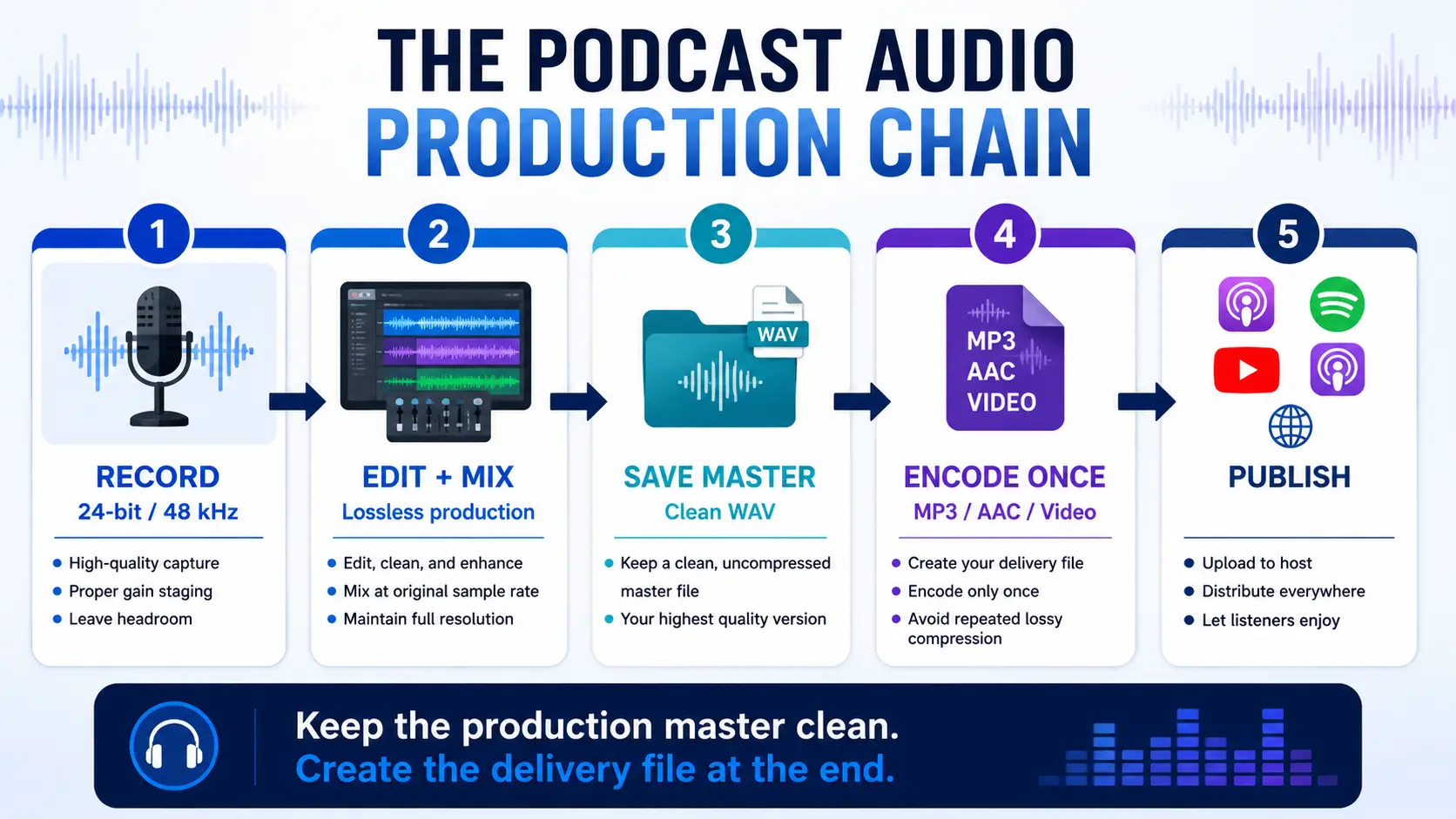
Record High Quality. Keep a Clean Master. Encode at the End.
This is the part of the workflow I care about more than obsessing over tiny differences between settings.
Record and edit from a high-quality lossless source.
Keep that master.
Then create the appropriate delivery version.
What I don’t want is this:
MP3 → edit → MP3 → process again → upload → transcode again
Lossy encoding is designed to discard information to reduce file size. Repeated lossy encoding can compound the damage.
A cleaner workflow looks like this:
24-bit / 48 kHz recording → lossless edit/master → final platform delivery encode
That separation matters.
Your production master and your listener delivery file do not have to be the same thing.
And once the recording and editing are under control, the next technical decision is how loud that master should actually be. That’s where podcast loudness and LUFS standards come into the workflow.
My Recommended Podcast Audio Workflow
For most of the podcasts I would build today:
Recording
24-bit / 48 kHz
Prefer WAV or another lossless recording format when available.
Editing
Keep the project at the original sample rate.
Avoid converting back and forth between 44.1 and 48 for no reason.
Mixing and processing
Maintain a high-resolution production file while you’re EQing, compressing, repairing, editing, and mastering.
Many modern DAWs perform internal processing at even higher precision. Adobe Audition, for example, uses 32-bit processing internally.
Master
Save a clean lossless master before creating distribution versions.
This is also the stage where you should think about final level and delivery loudness. If LUFS, peaks, and normalization still feel like another pile of audio-engineer vocabulary, see the guide to podcast loudness standards for Apple and Spotify.
Podcast delivery
Create the MP3 or AAC version required by your hosting and distribution workflow.
If you’re deciding what bitrate to use at that point, that’s a separate decision. The full explanation is in Podcast Bitrate Realities.
Video delivery
Keep your video project’s audio at 48 kHz when practical.
And if you’re building the video side of the show at the same time, don’t treat frame rate as another random settings-menu choice. Here’s the companion guide to choosing 24 fps or 30 fps for a video podcast.
That’s it.
No engineering degree required.
The Setting Matters. The Whole Signal Chain Matters More.
It’s easy to spend an hour debating 44.1 versus 48 while ignoring the microphone pointed at the ceiling.
Recording settings are one part of a production system.
Microphone choice matters.
Placement matters.
Room acoustics matter.
Gain staging matters.
Editing matters.
Loudness matters.
Encoding matters.
And consistency matters.
My default is 24-bit / 48 kHz because it’s a practical, professional working format for modern audio-and-video podcast production.
Set it correctly.
Save the preset.
Then move on and make the episode.
Frequently Asked Questions
Is 48 kHz better than 44.1 kHz for podcasting?
For an audio-and-video podcast workflow, 48 kHz is usually the more convenient production choice because it aligns well with video platforms and workflows. YouTube currently recommends 48 kHz audio for video uploads, while Apple Podcasts supports both 44.1 and 48 kHz for common podcast delivery formats.
Should I record my podcast at 16-bit or 24-bit?
Use 24-bit when your recording system supports it. It provides substantially more digital dynamic range than 16-bit and lets you record at sensible levels without trying to push your signal close to the digital ceiling.
Does 24-bit audio prevent clipping?
No. A 24-bit fixed-point recording can still clip. The practical benefit is greater available dynamic range, which allows you to leave more recording margin without worrying about the limitations associated with lower bit-depth capture.
Is 32-bit float necessary for podcasting?
Usually not. It can be valuable for unpredictable recording situations and properly designed hardware can preserve signal levels that would overload a conventional fixed-point file. For an ordinary controlled podcast studio, 24-bit recording remains a very capable format.
Should I record a podcast at 96 kHz?
Most spoken-word podcasts don’t need 96 kHz. For a typical audio-and-video podcast workflow, 48 kHz gives you a practical balance of compatibility, quality, storage, and processing requirements.
What should I learn after sample rate and bit depth?
The next step is understanding what happens when your high-quality master becomes the smaller file listeners actually stream or download. Continue with Podcast Bitrate Realities: Who Is Actually Compressing Your Audio Files?.