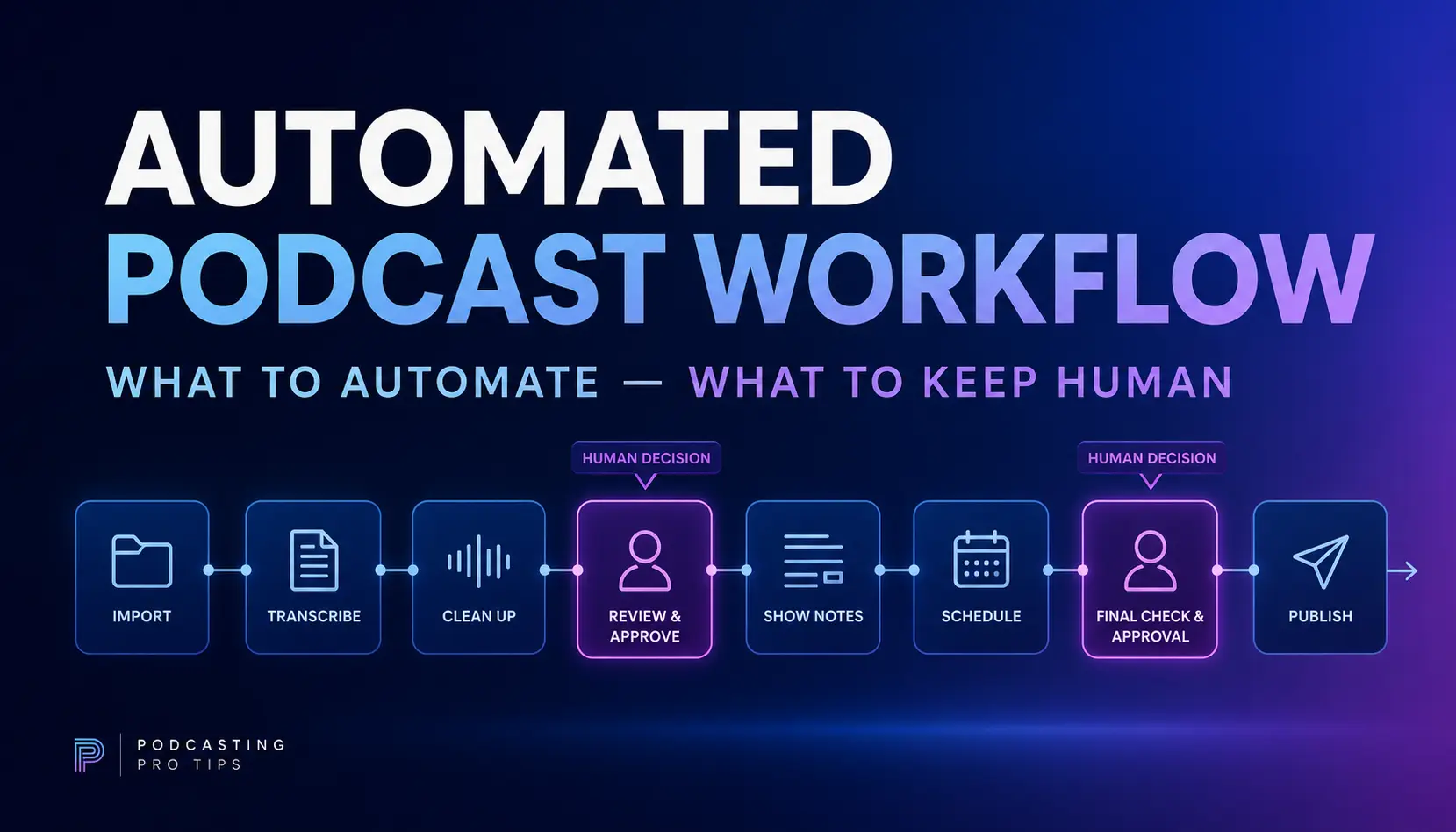
Podcast workflow automation can save a lot of unnecessary production work, but there is a catch: you need a repeatable workflow before you automate it.
If every episode is handled differently, automation usually doesn’t fix the problem. It just moves the confusion faster.
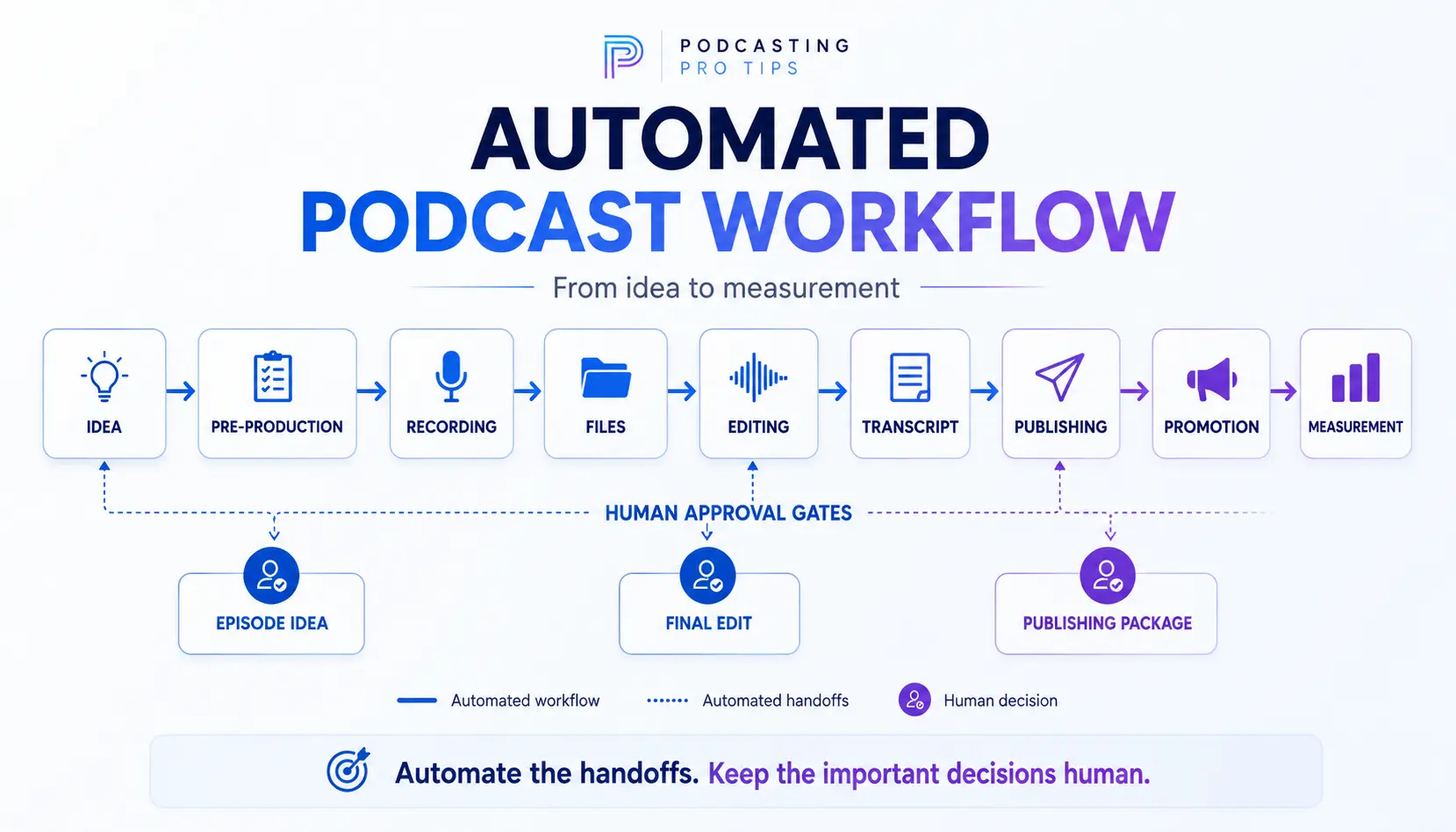
A better approach is to define how an episode moves from idea to published content, standardize the repeatable parts, automate predictable handoffs, and keep human judgment at the places where an actual decision still needs to be made.
That is the difference between automating a podcast and building a podcast production system.
What Is Podcast Workflow Automation?
Podcast workflow automation means using templates, software integrations, AI, scheduled actions, and repeatable processes to reduce manual work as an episode moves through production.
That can include things like:
- creating episode folders;
- moving or organizing files;
- generating transcripts;
- creating first drafts of show notes;
- creating draft social content;
- notifying team members when an episode reaches the next stage;
- scheduling approved episodes;
- updating production trackers;
- collecting performance data.
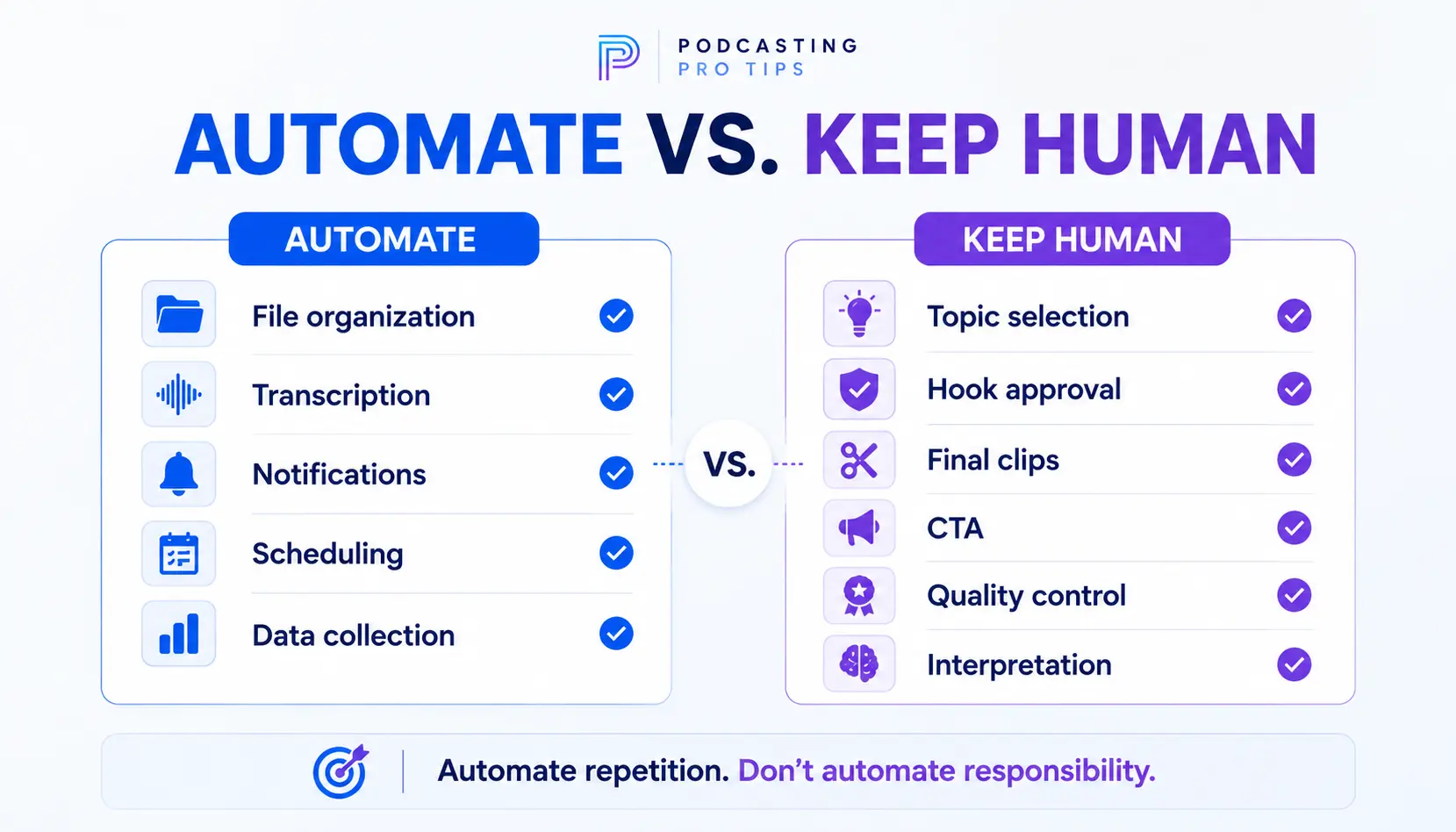
But not every podcast task should be automated.
Choosing whether an episode is worth recording, deciding what the listener actually needs, evaluating a hook, approving the final edit, choosing the right CTA, or deciding whether a clip represents your point correctly still requires judgment.
A useful rule is:
Automate repetition. Don’t automate responsibility.
Start With the Podcast Workflow Before You Start With Automation
One of the easiest mistakes is opening Zapier, Make, or another automation platform and asking:
“What can I automate?”
Start one step earlier.
Ask:
How should one episode move through my production system?
Map the stages first.
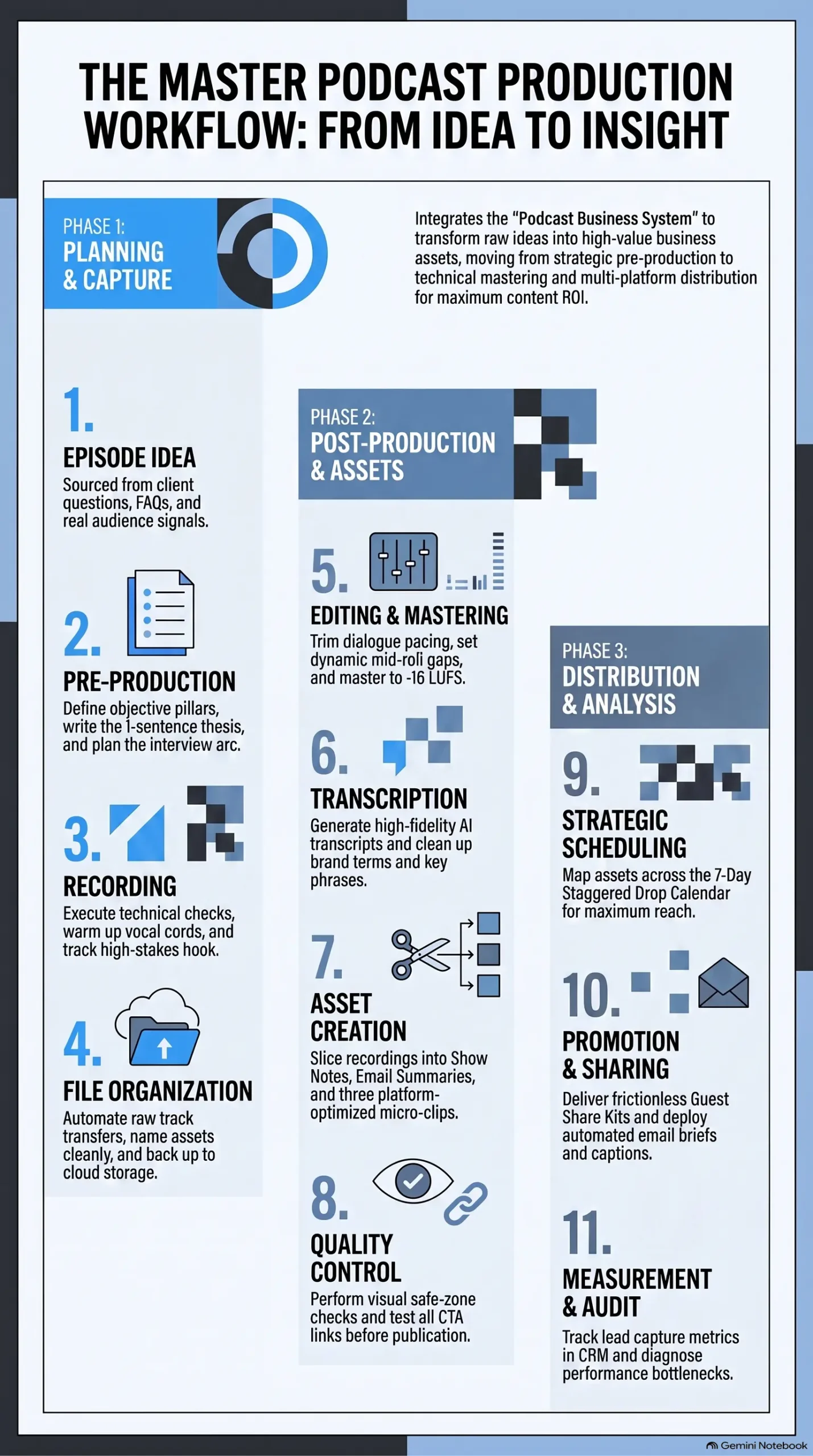
A basic podcast production workflow might look like this:
- Episode idea
- Pre-production
- Recording
- File organization
- Editing
- Transcript
- Publishing assets
- Quality control
- Scheduling
- Promotion
- Measurement
If those stages keep changing from episode to episode, automation isn’t the first problem to solve.
Your workflow is.
This is also why strong podcast pre-production matters. Decisions made before recording can eliminate a surprising amount of editing, rewriting, searching, and fixing afterward.
Phase 1: Standardize Your Episode Structure
Before connecting software, remove unnecessary decisions.
Create repeatable defaults for the parts of production that shouldn’t require reinvention every week.
For example:
Use the Same Episode Folder Structure
My basic working structure is:
- Assets
- Raw
- Projects
- Exports
The exact folders matter less than consistency.
If one episode lives on your desktop, another is buried in Downloads, and a third has files scattered between three cloud services, automation isn’t going to rescue the operation.
Give every episode a predictable home.
Use Consistent File Naming
Create a naming convention that tells you what the file is without opening it.
For example:
PPT-018-podcast-workflow-raw-camera-a
or
PPT-018-podcast-workflow-final-video
You don’t need an elaborate database naming system.
You just need enough consistency that you—or someone else—can identify the file six months later.
Create Repeatable Production Templates
Useful templates might include:
- episode planning sheet;
- recording checklist;
- guest preparation form;
- show-notes structure;
- publishing checklist;
- YouTube upload checklist;
- CTA review;
- post-production quality-control checklist.
Every template removes another blank page from the process.
And blank pages are where a lot of production time disappears.

Stop Starting Your Episodes from Scratch
Never stare at a blank page again. Get the Podcast Episode Outline Templates and unlock 6 plug-and-play studio structures so you can organize your ideas in minutes and record with total confidence.
Inside, you get the exact blueprints for:
Solo Teaching: Explain one useful idea clearly.
Interview: Guide a focused guest conversation.
Tactical Framework: Teach a step-by-step process.
Pattern-Interrupt: Challenge a common belief or mistake.
Client-Success / Case Study: Show proof through a real example.
Reverse Repurposing: Turn a strong clip, post, email reply, or audience question into a full episode.
Phase 2: Identify the Repetitive Handoffs
Now look for tasks that happen repeatedly with very little judgment.
Those are your strongest automation candidates.
For example:
Recording completed → create or update a production task
Transcript ready → move the episode into the publishing stage
Final export approved → notify the person responsible for publishing
Episode published → update the production tracker
Publishing complete → trigger the promotional-content workflow
These handoffs are different from decisions.
The automation doesn’t need to decide whether the episode is good.
It simply needs to recognize that one stage is finished and move the process to the next predictable stage.
Depending on your software stack, those connections may happen through native integrations, automation platforms, APIs, or a combination of them.
Platform capabilities and plan requirements change, so verify the exact integration before building an important workflow around it.
Phase 3: Use AI for Drafting, Not Automatic Publishing
AI can eliminate a lot of repetitive post-production writing.
Once you have a transcript, AI can help create first drafts of:
- episode summaries;
- show notes;
- chapters;
- social posts;
- email copy;
- YouTube descriptions;
- potential clips;
- article ideas;
- follow-up episode ideas.
That can be extremely useful.
But there is a big difference between:
AI creates the draft
and
AI publishes whatever it creates.
I would keep a human approval gate between those two steps.
A transcript may contain a sentence that makes a terrible clip when removed from context. A technically accurate summary may still miss the main point of the episode. An automatically generated CTA may send the listener somewhere that has nothing to do with what they just heard.
AI should reduce the mechanical work.
It shouldn’t remove editorial responsibility.
Phase 4: Turn One Recording Into a Content Workflow
A completed episode doesn’t have to be treated as one audio file and one YouTube upload.
The recording can become the source for a larger group of content assets.
That might include:
- the full podcast episode;
- the full YouTube video;
- two or three useful clips;
- an email;
- a LinkedIn post;
- an article;
- a graphic or carousel;
- a future episode idea.
This is where automation and repurposing start working together.
But don’t automatically create ten mediocre assets just because the software allows it.
Start with the strongest material in the recording.
I go deeper into that process in the guide to turning one podcast episode into multiple content assets.
The goal is not maximum output.
The goal is useful output without doing the same work ten separate times.
Phase 5: Batch the Work That Cannot Be Automated
Some production tasks become faster when they are grouped rather than automated.
That is batching.
For example, instead of:
record → edit → write → upload → promote → start again
you might:
- prepare several episodes together;
- record several episodes in one session;
- edit similar material together;
- review several finished episodes;
- schedule approved episodes ahead of time.
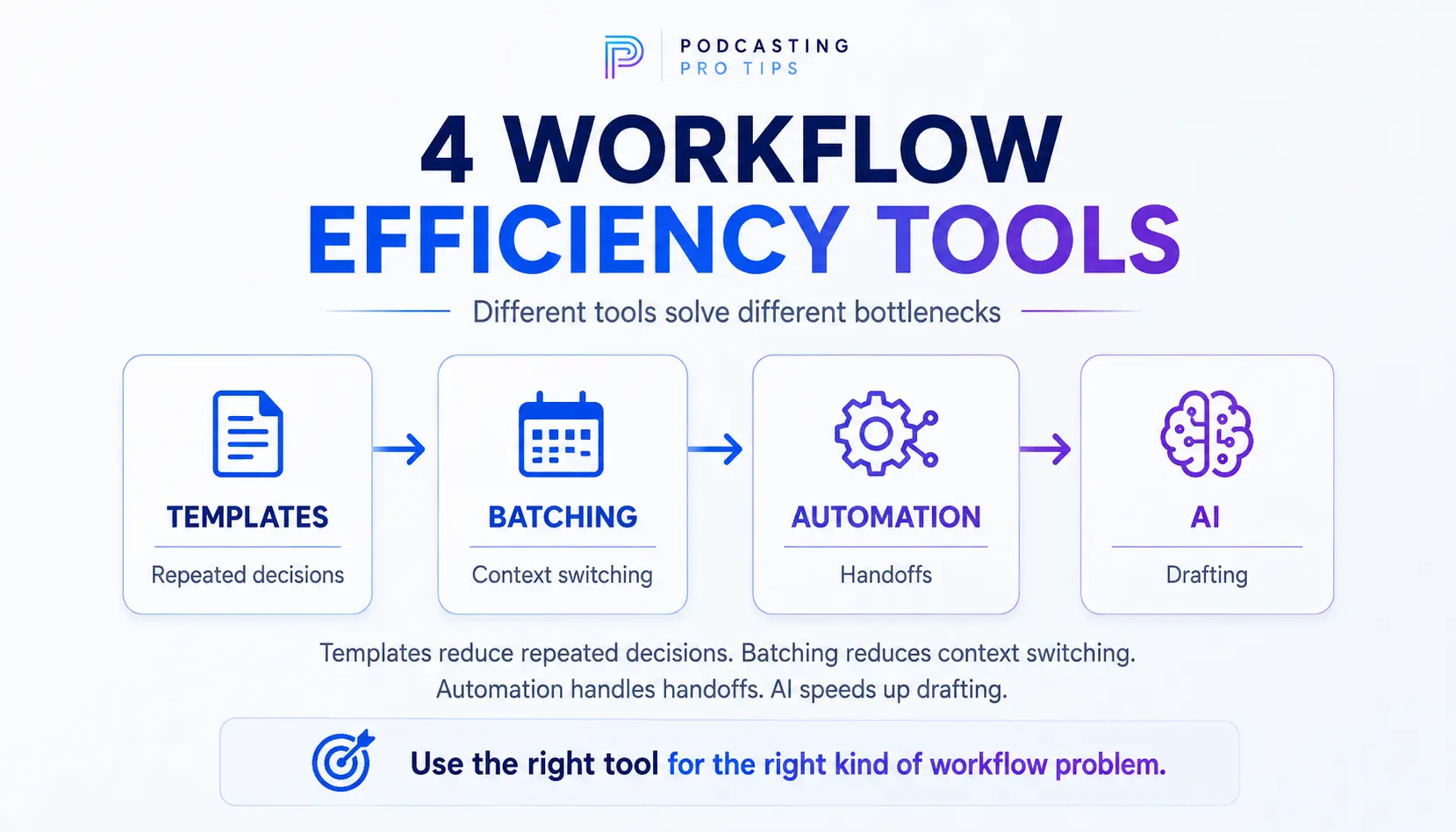
Batching reduces context switching.
Automation reduces repetitive actions.
Templates reduce repeated decisions.
AI reduces repetitive drafting.
Those are four different tools for improving the same production system.
What Should You NOT Automate?
This is where podcast automation gets interesting.
The more important the decision is to the listener or the business, the less comfortable I am handing it completely to an automation.
I would normally keep human control over:
Episode Selection
Just because AI can generate 100 podcast topics doesn’t mean 100 of them deserve to exist.
Someone still needs to decide what the show should talk about and why.
Hooks and Openings
AI can generate options.
The host or producer should still decide whether the opening actually represents the episode and gives the right listener a reason to continue.
Final Clip Selection
Software can identify possible moments.
A human should decide whether the clip has enough context to stand on its own.
Final Quality Control
Check the audio.
Check the video.
Check the title.
Check the description.
Check the links.
Check the thumbnail.
Check the CTA.
The boring final inspection is still cheaper than publishing the wrong thing everywhere automatically.
The Call to Action
Your CTA should follow naturally from the value of the episode.
Don’t permanently attach the same five links to every show note and call that a conversion strategy.
One useful next step is usually easier for the listener to understand.
If you’re working on this part of the process, see my guide to building a podcast call-to-action strategy.
Performance Decisions
Automation can collect data.
It cannot automatically tell you what the data means for your business.
Downloads, clicks, signups, inquiries, sales influence, content output, and listener behavior answer different questions.
The dashboard collects evidence.
Someone still needs to interpret it.

Turn passive listeners into paying clients
Stop leaving money on the table with vague endings and copy-paste these proven scripts to give your audience a clear path to convert.
A Simple Automated Podcast Workflow Blueprint
Here is a practical version of the complete system:
1. Approve the Episode Idea
Define the listener problem, episode job, takeaway, and intended next action.
Human decision.
2. Create the Episode Production Package
Generate the folder, planning document, checklist, and any necessary production tasks.
Good automation candidate.
3. Record the Episode
Use your established recording process.
Human production stage.
4. Organize the Recording Assets
Move or reference the recording files inside the correct episode structure.
Good automation candidate where your software supports it.
5. Edit and Approve the Episode
Complete technical and editorial finishing.
Human approval required.
6. Process the Transcript
Create the transcript and use it to generate draft publishing and promotional assets.
Excellent AI-assisted stage.
7. Review the Publishing Package
Approve the title, description, chapters, CTA, links, clips, and other assets.
Human approval required.
8. Schedule Distribution
Schedule approved content through the podcast host and appropriate publishing tools.
Good automation or batching candidate.
9. Publish Supporting Content
Release the approved clips, email, social posts, article, and other selected assets.
Automation can help after approval.
10. Collect the Evidence
Track what happened after publication.
Automate collection where practical. Interpret it manually.
That is a real automated podcast workflow.
Not one giant robot running your podcast.
A connected process where software handles predictable work and people handle important decisions.
How Much Time Will Podcast Automation Save?
There is no honest universal number.
A solo podcaster publishing a short weekly episode has a completely different workload from a business producing a 45-minute video interview with clips, articles, email, social posts, approvals, and multiple distribution channels.
Measure your own workflow instead.
For a few episodes, track:
- preparation time;
- recording time;
- editing time;
- publishing time;
- repurposing time;
- administrative time;
- time spent fixing mistakes.
Then automate one bottleneck.
Measure again.
That gives you something far more useful than a generic claim about saving five hours.
It gives you evidence from your actual production process.
Automation Works Best After the Podcast Has a System
The goal isn’t to automate the largest number of tasks.
The goal is to stop rebuilding your podcast every time you record an episode.
Define the workflow.
Standardize what repeats.
Automate predictable handoffs.
Use AI for repetitive drafting.
Batch similar work.
Keep human judgment around the decisions that affect the listener, the show, and the business.
That’s when podcast automation actually becomes useful.
And if the larger problem is that your strategy, episode development, production, CTAs, publishing, and repurposing still live in separate places, that is exactly why I built the Podcast Business System + Podcast Production OS.
It creates the strategy first, then gives you a repeatable production environment for using that strategy across future episodes and supporting content.